Infinite scroll, when used correctly, is a wonderful tool for improving engagement on your website. You lower your users’ barrier to getting the next page of content, which increases their chances to find something interesting and click through.
I refer to infinite scrolling as any technique that uses AJAX to load additional content without reloading the page. I’ll provide a general walkthrough of the tools required, then provide two examples of different implementations.
Summary
There are three main components to infinite scroll.
- The trigger. This is what starts the loading of new content. It is typically scroll-based (ex: load more posts when users is X pixels from bottom of page) or click-based (ex: clicking a “load more” button)
- The AJAX query. This is the Javascript actually asking for the new content, and then inserting it into the page.
- The WordPress query. The PHP code in your theme or plugin that does a WP Query, formats the data, and returns it when asked by the AJAX query.
Scroll to Load More
The first example is a standard “Scroll to Load More”. When the user is a certain distance from the end of the post listing, more posts are loaded and inserted at the bottom. I implemented this on Western Journalism.

The WordPress Query
When you create your AJAX query, you’ll specify an action (see load-more.js, line 23). You’ll then hook a WordPress function to that action, and it will get run any time that AJAX query runs.
The hooks you use are wp_ajax_{action} and wp_ajax_nopriv_{action}. Let’s call our action “be_ajax_load_more”, and we’d hook our function like so:
| <?php | |
| /** | |
| * AJAX Load More | |
| * @link http://www.billerickson.net/infinite-scroll-in-wordpress | |
| */ | |
| function be_ajax_load_more() { | |
| $data = 'Additional posts go here'; | |
| wp_send_json_success( $data ); | |
| wp_die(); | |
| } | |
| add_action( 'wp_ajax_be_ajax_load_more', 'be_ajax_load_more' ); | |
| add_action( 'wp_ajax_nopriv_be_ajax_load_more', 'be_ajax_load_more' ); |
You’ll pass useful data to your function using the $_POST variable. Here’s a full example of the WordPress query. We’re grabbing query variables from $_POST, doing the query, and returning the result. I’m using a function called be_post_summary() to output the individual post. You’ll need to define this function yourself so it outputs the post formatted the way you’d like.
| <?php | |
| /** | |
| * AJAX Load More | |
| * @link http://www.billerickson.net/infinite-scroll-in-wordpress | |
| */ | |
| function be_ajax_load_more() { | |
| $args = isset( $_POST['query'] ) ? array_map( 'esc_attr', $_POST['query'] ) : array(); | |
| $args['post_type'] = isset( $args['post_type'] ) ? esc_attr( $args['post_type'] ) : 'post'; | |
| $args['paged'] = esc_attr( $_POST['page'] ); | |
| $args['post_status'] = 'publish'; | |
| ob_start(); | |
| $loop = new WP_Query( $args ); | |
| if( $loop->have_posts() ): while( $loop->have_posts() ): $loop->the_post(); | |
| be_post_summary(); | |
| endwhile; endif; wp_reset_postdata(); | |
| $data = ob_get_clean(); | |
| wp_send_json_success( $data ); | |
| wp_die(); | |
| } | |
| add_action( 'wp_ajax_be_ajax_load_more', 'be_ajax_load_more' ); | |
| add_action( 'wp_ajax_nopriv_be_ajax_load_more', 'be_ajax_load_more' ); |
Enqueue the Javascript
We need to enqueue a Javascript file which will contain all our relevant JS. We also need to pass along the information our WordPress plugin needs using wp_localize_script().
| <?php | |
| /** | |
| * Javascript for Load More | |
| * | |
| */ | |
| function be_load_more_js() { | |
| global $wp_query; | |
| $args = array( | |
| 'url' => admin_url( 'admin-ajax.php' ), | |
| 'query' => $wp_query->query, | |
| ); | |
| wp_enqueue_script( 'be-load-more', get_stylesheet_directory_uri() . '/js/load-more.js', array( 'jquery' ), '1.0', true ); | |
| wp_localize_script( 'be-load-more', 'beloadmore', $args ); | |
| } | |
| add_action( 'wp_enqueue_scripts', 'be_load_more_js' ); |
In this example I’m also passing along the URL for the AJAX query and the current WordPress query so that we can use it when requesting additional posts.
Setup the Javascript
Now it’s time for the actual Javascript file. In my theme I created a /js directory and load-more.js inside it. You can name and place your file anywhere, but make sure the wp_enqueue_script() above properly links to it. Below the code snippet I’ll walk through what’s happening line-by-line.
| jQuery(function($){ | |
| $('.post-listing').append( '<span class="load-more"></span>' ); | |
| var button = $('.post-listing .load-more'); | |
| var page = 2; | |
| var loading = false; | |
| var scrollHandling = { | |
| allow: true, | |
| reallow: function() { | |
| scrollHandling.allow = true; | |
| }, | |
| delay: 400 //(milliseconds) adjust to the highest acceptable value | |
| }; | |
| $(window).scroll(function(){ | |
| if( ! loading && scrollHandling.allow ) { | |
| scrollHandling.allow = false; | |
| setTimeout(scrollHandling.reallow, scrollHandling.delay); | |
| var offset = $(button).offset().top - $(window).scrollTop(); | |
| if( 2000 > offset ) { | |
| loading = true; | |
| var data = { | |
| action: 'be_ajax_load_more', | |
| page: page, | |
| query: beloadmore.query, | |
| }; | |
| $.post(beloadmore.url, data, function(res) { | |
| if( res.success) { | |
| $('.post-listing').append( res.data ); | |
| $('.post-listing').append( button ); | |
| page = page + 1; | |
| loading = false; | |
| } else { | |
| // console.log(res); | |
| } | |
| }).fail(function(xhr, textStatus, e) { | |
| // console.log(xhr.responseText); | |
| }); | |
| } | |
| } | |
| }); | |
| }); |
3-4 I’m creating an element with a class of .load-more and sticking it at the bottom of my post container (.post-listing). We’ll detect how far away the user is from this element to determine when to load more posts
5-6 Create some variables we’ll need. Setting page = 2 since we’ll be loading the second page. The loading variable will tell us if we’re actively waiting for the next set of posts, so we don’t send multiple requests.
7-13 Instead of running the next block of code every microsecond the user is scrolling, I’m setting up a timer. When scrolling, it is only allowed to check every 400 microseconds (this can be adjusted if needed).
15 If the user is scrolling…
16 And we’re not already loading posts, and the timer will let us check…
17-18 Reset the timer
19 Calculate distance between the window’s current location and the .load-more element
20 If we’re within 2000px of the .load-more element…
21 Set loading to true since we’re about to load new posts
22-27 Setup the data we’re passing to our WP function. We’re including the action, the page we want to load, and the other query variables.
28 Make the AJAX request to the proper AJAX URL and pass along our data
29-33 If the AJAX request is successful, stick the returned data at the bottom of our post container, then move the .load-more element below it (resetting the distance between the window and the button). Increase our page count (so next time we’ll get page 3), and set loading to false.
34-36 If we don’t get a success message back, do nothing (for now). Uncomment the console.log line and whatever information is received will be displayed in your browser’s console.
37-39 If it fails, do nothing (for now). Like above, you can uncomment the console.log for more details about what went wrong.
And that’s it! We now have infinite scroll working on archive pages. For reference, here’s the full code
Infinite Scroll – Click to Load More
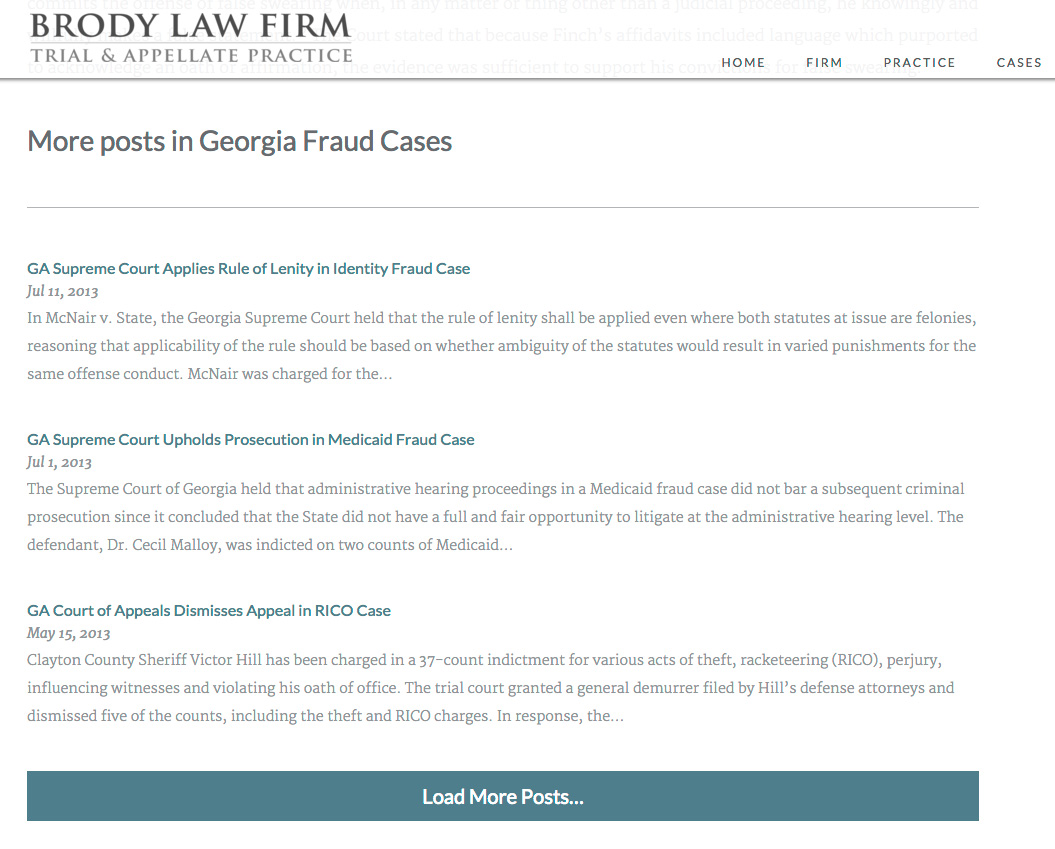
On Brody Law Firm’s website (not live, coming soon), at the bottom of an individual post we display more posts from the same category and a button to load more. The code to power this is very similar to the above example, except we’re triggering it on click rather than on scroll.
| <?php | |
| /** | |
| * Javascript for Load More | |
| * | |
| */ | |
| function be_load_more_js() { | |
| if( ! is_singular( 'post' ) ) | |
| return; | |
| $query = array( | |
| 'post__not_in' => array( get_queried_object_id() ), | |
| 'category_name' => ea_first_term( 'category', 'slug' ), | |
| 'posts_per_page' => 3 | |
| ); | |
| $args = array( | |
| 'url' => admin_url( 'admin-ajax.php' ), | |
| 'query' => $query, | |
| ); | |
| wp_enqueue_script( 'be-load-more', get_stylesheet_directory_uri() . '/js/load-more.js', array( 'jquery' ), '1.0', true ); | |
| wp_localize_script( 'be-load-more', 'beloadmore', $args ); | |
| } | |
| add_action( 'wp_enqueue_scripts', 'be_load_more_js' ); | |
| /** | |
| * AJAX Load More | |
| * | |
| */ | |
| function be_ajax_load_more() { | |
| $args = isset( $_POST['query'] ) ? array_map( 'esc_attr', $_POST['query'] ) : array(); | |
| $args['post_type'] = isset( $args['post_type'] ) ? esc_attr( $args['post_type'] ) : 'post'; | |
| $args['paged'] = esc_attr( $_POST['page'] ); | |
| $args['post_status'] = 'publish'; | |
| ob_start(); | |
| $loop = new WP_Query( $args ); | |
| if( $loop->have_posts() ): while( $loop->have_posts() ): $loop->the_post(); | |
| be_post_summary(); | |
| endwhile; endif; wp_reset_postdata(); | |
| $data = ob_get_clean(); | |
| wp_send_json_success( $data ); | |
| wp_die(); | |
| } | |
| add_action( 'wp_ajax_be_ajax_load_more', 'be_ajax_load_more' ); | |
| add_action( 'wp_ajax_nopriv_be_ajax_load_more', 'be_ajax_load_more' ); | |
| /** | |
| * First Term | |
| * Helper Function | |
| */ | |
| function ea_first_term( $taxonomy, $field ) { | |
| $terms = get_the_terms( get_the_ID(), $taxonomy ); | |
| if( empty( $terms ) || is_wp_error( $terms ) ) | |
| return false; | |
| // If there's only one term, use that | |
| if( 1 == count( $terms ) ) { | |
| $term = array_shift( $terms ); | |
| } else { | |
| $term = array_shift( $list ); | |
| } | |
| // Output | |
| if( $field && isset( $term->$field ) ) | |
| return $term->$field; | |
| else | |
| return $term; | |
| } |
| jQuery(function($){ | |
| $('.post-listing').append( '<span class="load-more">Click here to load earlier stories</span>' ); | |
| var button = $('.post-listing .load-more'); | |
| var page = 2; | |
| var loading = false; | |
| $('body').on('click', '.load-more', function(){ | |
| if( ! loading ) { | |
| loading = true; | |
| var data = { | |
| action: 'be_ajax_load_more', | |
| page: page, | |
| query: beloadmore.query, | |
| }; | |
| $.post(beloadmore.url, data, function(res) { | |
| if( res.success) { | |
| $('.post-listing').append( res.data ); | |
| $('.post-listing').append( button ); | |
| page = page + 1; | |
| loading = false; | |
| } else { | |
| // console.log(res); | |
| } | |
| }).fail(function(xhr, textStatus, e) { | |
| // console.log(xhr.responseText); | |
| }); | |
| } | |
| }); | |
| }); |
I’m only enqueuing this script on single posts. For the query, we’re requesting posts in the same category, excluding the current post. Also note how the Javascript file triggers the AJAX query when the .load-more element is clicked, rather than on scroll.
Any Questions?
I hope this in-depth tutorial helps you implement infinite scroll in your own projects.

AJ Clarke says
Works perfectly. Thanks Bill for the guide 😉 I had created my own load more function in the past, but this is a lot simpler then what I had.
Sridhar Katakam says
Hi Bill,
I am trying this (on click) in archive.php in Genesis but nothing happens when “Click here to load earlier stories” is clicked.
Below is my code:
https://gist.github.com/srikat/ec7806a4e159102105598b36428ee8f9
In the console I see 0 for
console.log(res);.Any ideas?
Sridhar Katakam says
ok, found the fix. Moved the be_ajax_load_more() along with the 2 action lines from archive.php to functions.php.
Now to figure out how to remove “Click here to load earlier stories” after posts are shown..
Sridhar Katakam says
Got it.
Sridhar Katakam says
and just to complete my talking-to-self session, I’ve published a step by step actionable tutorial to implement your solution in Genesis here: https://sridharkatakam.com/load-posts-demand-using-ajax-genesis/
Thank you. 🙂
Lauren Gray says
Bill, your code was a welcome reprieve from attempting to make this on my own – thank you for sharing!
I’ve created a version that supports column classes, custom settings by page, and both auto + button loading. I’d love feedback on how to improve this code – it’s working, but I haven’t optimized it. Anyone who is looking for something similar is welcome to use this as a starting point!
https://gist.github.com/oncecoupled/86daa4f23aa8749c0933f72133ac7106
BTW, Bill, you have an extra closing bracket on line 26 of the final functions.php file (on-click version).
Bill Erickson says
Looks great! The only improvement I’d recommend is moving the “load more” Javascript into its own function since it’s used in two different contexts.
Matt Pramschufer says
For the purposes of newbies here. If someone is looking to display the standard genesis formatting for the loaded content you could simply have
function be_post_summary(){
do_action( ‘genesis_before_entry’ );
printf( ”, genesis_attr( ‘entry’ ) );
do_action( ‘genesis_entry_header’ );
do_action( ‘genesis_before_entry_content’ );
printf( ”, genesis_attr( ‘entry-content’ ) );
do_action( ‘genesis_entry_content’ );
echo ”;
do_action( ‘genesis_after_entry_content’ );
do_action( ‘genesis_entry_footer’ );
echo ”;
do_action( ‘genesis_after_entry’ );
}
Pankaj S. says
Hi Bill, Thanks for share this awesome tutorial…
One question for you. Suggest me how can i optimize this ajax triggered again and again. Is it possible to add fixed area for ajax trigger. For example when we reach the bottom of wrapper div then ajax call instead of every scroll.
Thanks again 🙂
Bill Erickson says
That’s exactly what we’re doing. We’re adding an item at the bottom of the page (.load-more) and once the browser reaches it, load more posts. The problem is the browser won’t tell you when you reach it – you have to check the distance while scrolling. The “scroll handling” part is how we minimize how often our code runs. Instead of running every millisecond that the user scrolls, we set a timer and only run every 400 milliseconds (you can change this to whatever you like).
On line 12 you set the delay on the timer. On line 16-18 you’ll see it checks the scroll timer to make sure it’s allowed to load, and if so it resets the timer.
Brett Pollett says
Hey Bill, this tutorial was great and super easy to implement, I just had one issue. It worked great when I was using it on my custom post type archive page, but then I wanted to convert that archive into a page template and the ajax load stopped working. It seems as though this function is not even called on a page template that includes a query. Is there a simple modification to the script to allow it to be called on page templates as well?
Bill Erickson says
The problem is this code uses the query settings for the Main Query, not your custom query. See this line. You would need to change this to pass your custom query arguments.
John Buchmann says
I’m in a similar (same?) situation as Brett. I have a Search Results “page template” that uses a custom query. The results are from a Custom Post Type.
The Page Template does a query (based on user input) and adds all results into an ARRAY of IDs.
In the “Ajax Load More” code, if I hard code an array of IDs as one of the $args, it totally works. For example:
$args[‘post__in’] = array (5, 6, 7, 8, 9, 10, 11, 12);
The IDs obviously will be different depending on the search the end user makes.
(I hard code it for proof of concept, but in the real site the array would be a variable)
How could it be possible to pass in this array rather than hard code it? If I can pass this array in, it will surely allow for infinite scrolling for a custom query. Any advice you can share would be really helpful! Thx!
Bill Erickson says
Why are you doing one query (to get the IDs), then a separate query (to get the posts)? What if the results of the search generate 50,000 post IDs? Are you going to try passing an array that large?
You should just pass the search query (ex: ?s=something) and the page (ex: get_query_var( ‘paged’ )) to WordPress to do the query itself. Then the infinite scroll code can simply get the next page of these results.
John Buchmann says
Thanks for such a fast reply!
Unfortunately the site search isn’t just a simple “s=”. It’s a Real Estate site with many custom search parameters, (min/max price, property type, location, etc.) from custom data entry fields. So the user isn’t just searching the title and content of a post.
I suppose the search code could be re-written so that it doesn’t return a list of IDs, and is instead a bunch of $args for a wp_query statement. But before I commit to that, in testing I hard coded the $args in to simulate an actual search…
On initial page load the correct results show up on page 1 (as expected), but page 2 ignores the query and outputs results that can duplicate stuff in page 1. I think the problem is, in the ‘query’ argument for beloadmore:
‘query’ => $wp_query->query,
returns this when I do a print_r:
Array([page]=>[page_name]=>search-results)
“search-results” is my Page Template that displays the custom search results. This doesn’t appear to be a proper query. So there is still the issue of somehow passing in the custom query. Thoughts?
Alternatively, my original quesiton about passing in a potentially long array I think would still be viable. I’ve seen my theme pull in results in the thousands, and it’s just as quick as if it were a small array. 🙂
I feel like I’m so close. I would probably give up by now if it weren’t for the fact that I spent nearly 3 full days on this. I feel like i’m at the point of no return. 🙂
Bill Erickson says
Correct. As mentioned above, this code is designed to use the main WordPress query. You’ll want to replace that line with whatever you want to pass along to do your custom query.
I think the best approach would be to pass along all the relevant GET parameters that accompany your custom search fields, so that you can do a single meta query. But you could also pass along an array of post IDs if you wanted.
Pass along whatever parameters you want in the
be_load_more_js()function, then use those parameters to do a WP_Query in thebe_ajax_load_more()function.John Buchmann says
Hmmm… I’ll have to let that response soak in and hopefully make sense as I experiment with your advice. 🙂 Thx so much, you have been of great help and your article is indispensable. If I figure this out I’ll let you know!
meysam says
Thanks for sharing, Bill!
I was a problem . i want use this cods on the post’s of category. how can i use it ?? ?
i don’t have navigation number , i have load more button in the archive category.
Thx!
John Buchmann says
Again, thanks for the great article. I was finally able to get it all working for the most part, but just when I think I’ve got it licked, I ran into a problem…
In the be_post_summary() function, I can output HTML, the_title(), the_excerpt(), etc. But I cannot get post meta with this:
ID, “price”, true);
?>
It prints a blank string.
This is a custom field called “price”. I also have a bunch of other custom meta fields that I need to display. Note: I’m looping through posts from a Custom Post Type, not regular blog posts.
Can you offer any advice on how to pull this in? Thanks!
John Buchmann says
Whoops, my code got messed up because I wrapped it in PHP tags. This is the get_post_meta:
echo get_post_meta($post->ID, “price_value”, true);
Bill Erickson says
My guess is you didn’t call the
global $post;first. A simpler approach is to useget_the_ID()instead:echo get_post_meta( get_the_ID(), 'price_value', true );John Buchmann says
Wow, that works; such a simple change. I’m learning so much… Thanks SO MUCH! 😀
Kurt says
I’m having issues getting this to work on an archive for a Custom Post Type.
Should I be following the code on this page or the code in this link?
https://gist.github.com/billerickson/669a1477068f0d4b5dc0
And when I update the content for a custom post type do I change this line?
$args[‘post_type’] = isset( $args[‘post_type’] ) ? $args[‘post_type’] : ‘post’;
$args[‘post_type’] = isset( $args[‘post_type’] ) ? $args[‘post_type’] : ‘work’;
Ultimately I want to get this to work using a custom query (WP_Query) but for now if I can get this to work on an archive page that will be a good start.
Bill Erickson says
Either code should work. The one you linked to simply combines the different sections of code featured above in this post (I think, I didn’t run a diff across them, that’s just eyeballing it).
No, you shouldn’t need to specify the post type. You’re passing all the query vars on this line. On a custom post type archive, one of those query vars will be
'post_type' => 'my_cpt'. The standard blog archive doesn’t include a post type parameter, which is why we’re setting it to ‘post’ if it isn’t set already.Estefany Pacheco says
I have a custom page integrated with WordPress I’m trying to use the 2nd method and this is what i get “Uncaught ReferenceError: beloadmore is not defined”, I’ve installed WordPress in a folder, not directly on my root may this be my issue? if it is where should I paste the code?