Infinite scroll, when used correctly, is a wonderful tool for improving engagement on your website. You lower your users’ barrier to getting the next page of content, which increases their chances to find something interesting and click through.
I refer to infinite scrolling as any technique that uses AJAX to load additional content without reloading the page. I’ll provide a general walkthrough of the tools required, then provide two examples of different implementations.
Summary
There are three main components to infinite scroll.
- The trigger. This is what starts the loading of new content. It is typically scroll-based (ex: load more posts when users is X pixels from bottom of page) or click-based (ex: clicking a “load more” button)
- The AJAX query. This is the Javascript actually asking for the new content, and then inserting it into the page.
- The WordPress query. The PHP code in your theme or plugin that does a WP Query, formats the data, and returns it when asked by the AJAX query.
Scroll to Load More
The first example is a standard “Scroll to Load More”. When the user is a certain distance from the end of the post listing, more posts are loaded and inserted at the bottom. I implemented this on Western Journalism.

The WordPress Query
When you create your AJAX query, you’ll specify an action (see load-more.js, line 23). You’ll then hook a WordPress function to that action, and it will get run any time that AJAX query runs.
The hooks you use are wp_ajax_{action} and wp_ajax_nopriv_{action}. Let’s call our action “be_ajax_load_more”, and we’d hook our function like so:
| <?php | |
| /** | |
| * AJAX Load More | |
| * @link http://www.billerickson.net/infinite-scroll-in-wordpress | |
| */ | |
| function be_ajax_load_more() { | |
| $data = 'Additional posts go here'; | |
| wp_send_json_success( $data ); | |
| wp_die(); | |
| } | |
| add_action( 'wp_ajax_be_ajax_load_more', 'be_ajax_load_more' ); | |
| add_action( 'wp_ajax_nopriv_be_ajax_load_more', 'be_ajax_load_more' ); |
You’ll pass useful data to your function using the $_POST variable. Here’s a full example of the WordPress query. We’re grabbing query variables from $_POST, doing the query, and returning the result. I’m using a function called be_post_summary() to output the individual post. You’ll need to define this function yourself so it outputs the post formatted the way you’d like.
| <?php | |
| /** | |
| * AJAX Load More | |
| * @link http://www.billerickson.net/infinite-scroll-in-wordpress | |
| */ | |
| function be_ajax_load_more() { | |
| $args = isset( $_POST['query'] ) ? array_map( 'esc_attr', $_POST['query'] ) : array(); | |
| $args['post_type'] = isset( $args['post_type'] ) ? esc_attr( $args['post_type'] ) : 'post'; | |
| $args['paged'] = esc_attr( $_POST['page'] ); | |
| $args['post_status'] = 'publish'; | |
| ob_start(); | |
| $loop = new WP_Query( $args ); | |
| if( $loop->have_posts() ): while( $loop->have_posts() ): $loop->the_post(); | |
| be_post_summary(); | |
| endwhile; endif; wp_reset_postdata(); | |
| $data = ob_get_clean(); | |
| wp_send_json_success( $data ); | |
| wp_die(); | |
| } | |
| add_action( 'wp_ajax_be_ajax_load_more', 'be_ajax_load_more' ); | |
| add_action( 'wp_ajax_nopriv_be_ajax_load_more', 'be_ajax_load_more' ); |
Enqueue the Javascript
We need to enqueue a Javascript file which will contain all our relevant JS. We also need to pass along the information our WordPress plugin needs using wp_localize_script().
| <?php | |
| /** | |
| * Javascript for Load More | |
| * | |
| */ | |
| function be_load_more_js() { | |
| global $wp_query; | |
| $args = array( | |
| 'url' => admin_url( 'admin-ajax.php' ), | |
| 'query' => $wp_query->query, | |
| ); | |
| wp_enqueue_script( 'be-load-more', get_stylesheet_directory_uri() . '/js/load-more.js', array( 'jquery' ), '1.0', true ); | |
| wp_localize_script( 'be-load-more', 'beloadmore', $args ); | |
| } | |
| add_action( 'wp_enqueue_scripts', 'be_load_more_js' ); |
In this example I’m also passing along the URL for the AJAX query and the current WordPress query so that we can use it when requesting additional posts.
Setup the Javascript
Now it’s time for the actual Javascript file. In my theme I created a /js directory and load-more.js inside it. You can name and place your file anywhere, but make sure the wp_enqueue_script() above properly links to it. Below the code snippet I’ll walk through what’s happening line-by-line.
| jQuery(function($){ | |
| $('.post-listing').append( '<span class="load-more"></span>' ); | |
| var button = $('.post-listing .load-more'); | |
| var page = 2; | |
| var loading = false; | |
| var scrollHandling = { | |
| allow: true, | |
| reallow: function() { | |
| scrollHandling.allow = true; | |
| }, | |
| delay: 400 //(milliseconds) adjust to the highest acceptable value | |
| }; | |
| $(window).scroll(function(){ | |
| if( ! loading && scrollHandling.allow ) { | |
| scrollHandling.allow = false; | |
| setTimeout(scrollHandling.reallow, scrollHandling.delay); | |
| var offset = $(button).offset().top - $(window).scrollTop(); | |
| if( 2000 > offset ) { | |
| loading = true; | |
| var data = { | |
| action: 'be_ajax_load_more', | |
| page: page, | |
| query: beloadmore.query, | |
| }; | |
| $.post(beloadmore.url, data, function(res) { | |
| if( res.success) { | |
| $('.post-listing').append( res.data ); | |
| $('.post-listing').append( button ); | |
| page = page + 1; | |
| loading = false; | |
| } else { | |
| // console.log(res); | |
| } | |
| }).fail(function(xhr, textStatus, e) { | |
| // console.log(xhr.responseText); | |
| }); | |
| } | |
| } | |
| }); | |
| }); |
3-4 I’m creating an element with a class of .load-more and sticking it at the bottom of my post container (.post-listing). We’ll detect how far away the user is from this element to determine when to load more posts
5-6 Create some variables we’ll need. Setting page = 2 since we’ll be loading the second page. The loading variable will tell us if we’re actively waiting for the next set of posts, so we don’t send multiple requests.
7-13 Instead of running the next block of code every microsecond the user is scrolling, I’m setting up a timer. When scrolling, it is only allowed to check every 400 microseconds (this can be adjusted if needed).
15 If the user is scrolling…
16 And we’re not already loading posts, and the timer will let us check…
17-18 Reset the timer
19 Calculate distance between the window’s current location and the .load-more element
20 If we’re within 2000px of the .load-more element…
21 Set loading to true since we’re about to load new posts
22-27 Setup the data we’re passing to our WP function. We’re including the action, the page we want to load, and the other query variables.
28 Make the AJAX request to the proper AJAX URL and pass along our data
29-33 If the AJAX request is successful, stick the returned data at the bottom of our post container, then move the .load-more element below it (resetting the distance between the window and the button). Increase our page count (so next time we’ll get page 3), and set loading to false.
34-36 If we don’t get a success message back, do nothing (for now). Uncomment the console.log line and whatever information is received will be displayed in your browser’s console.
37-39 If it fails, do nothing (for now). Like above, you can uncomment the console.log for more details about what went wrong.
And that’s it! We now have infinite scroll working on archive pages. For reference, here’s the full code
Infinite Scroll – Click to Load More
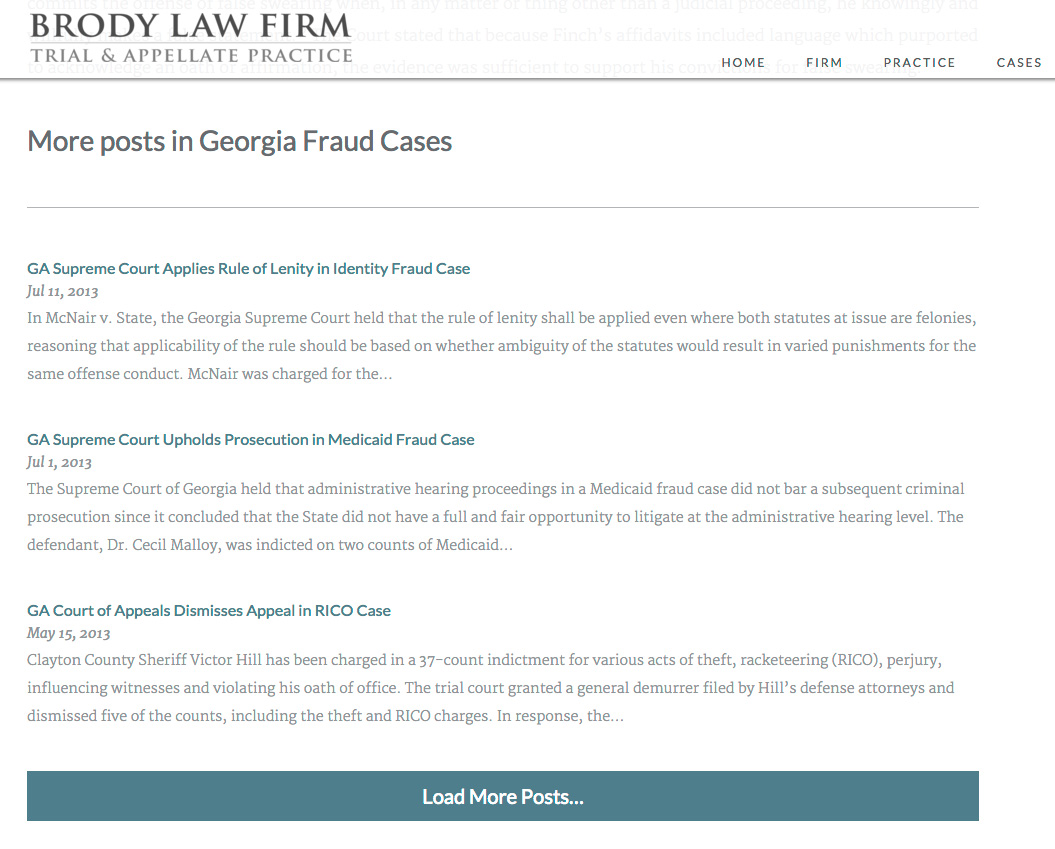
On Brody Law Firm’s website (not live, coming soon), at the bottom of an individual post we display more posts from the same category and a button to load more. The code to power this is very similar to the above example, except we’re triggering it on click rather than on scroll.
| <?php | |
| /** | |
| * Javascript for Load More | |
| * | |
| */ | |
| function be_load_more_js() { | |
| if( ! is_singular( 'post' ) ) | |
| return; | |
| $query = array( | |
| 'post__not_in' => array( get_queried_object_id() ), | |
| 'category_name' => ea_first_term( 'category', 'slug' ), | |
| 'posts_per_page' => 3 | |
| ); | |
| $args = array( | |
| 'url' => admin_url( 'admin-ajax.php' ), | |
| 'query' => $query, | |
| ); | |
| wp_enqueue_script( 'be-load-more', get_stylesheet_directory_uri() . '/js/load-more.js', array( 'jquery' ), '1.0', true ); | |
| wp_localize_script( 'be-load-more', 'beloadmore', $args ); | |
| } | |
| add_action( 'wp_enqueue_scripts', 'be_load_more_js' ); | |
| /** | |
| * AJAX Load More | |
| * | |
| */ | |
| function be_ajax_load_more() { | |
| $args = isset( $_POST['query'] ) ? array_map( 'esc_attr', $_POST['query'] ) : array(); | |
| $args['post_type'] = isset( $args['post_type'] ) ? esc_attr( $args['post_type'] ) : 'post'; | |
| $args['paged'] = esc_attr( $_POST['page'] ); | |
| $args['post_status'] = 'publish'; | |
| ob_start(); | |
| $loop = new WP_Query( $args ); | |
| if( $loop->have_posts() ): while( $loop->have_posts() ): $loop->the_post(); | |
| be_post_summary(); | |
| endwhile; endif; wp_reset_postdata(); | |
| $data = ob_get_clean(); | |
| wp_send_json_success( $data ); | |
| wp_die(); | |
| } | |
| add_action( 'wp_ajax_be_ajax_load_more', 'be_ajax_load_more' ); | |
| add_action( 'wp_ajax_nopriv_be_ajax_load_more', 'be_ajax_load_more' ); | |
| /** | |
| * First Term | |
| * Helper Function | |
| */ | |
| function ea_first_term( $taxonomy, $field ) { | |
| $terms = get_the_terms( get_the_ID(), $taxonomy ); | |
| if( empty( $terms ) || is_wp_error( $terms ) ) | |
| return false; | |
| // If there's only one term, use that | |
| if( 1 == count( $terms ) ) { | |
| $term = array_shift( $terms ); | |
| } else { | |
| $term = array_shift( $list ); | |
| } | |
| // Output | |
| if( $field && isset( $term->$field ) ) | |
| return $term->$field; | |
| else | |
| return $term; | |
| } |
| jQuery(function($){ | |
| $('.post-listing').append( '<span class="load-more">Click here to load earlier stories</span>' ); | |
| var button = $('.post-listing .load-more'); | |
| var page = 2; | |
| var loading = false; | |
| $('body').on('click', '.load-more', function(){ | |
| if( ! loading ) { | |
| loading = true; | |
| var data = { | |
| action: 'be_ajax_load_more', | |
| page: page, | |
| query: beloadmore.query, | |
| }; | |
| $.post(beloadmore.url, data, function(res) { | |
| if( res.success) { | |
| $('.post-listing').append( res.data ); | |
| $('.post-listing').append( button ); | |
| page = page + 1; | |
| loading = false; | |
| } else { | |
| // console.log(res); | |
| } | |
| }).fail(function(xhr, textStatus, e) { | |
| // console.log(xhr.responseText); | |
| }); | |
| } | |
| }); | |
| }); |
I’m only enqueuing this script on single posts. For the query, we’re requesting posts in the same category, excluding the current post. Also note how the Javascript file triggers the AJAX query when the .load-more element is clicked, rather than on scroll.
Any Questions?
I hope this in-depth tutorial helps you implement infinite scroll in your own projects.

Gareth says
Hi Bill, thanks for your solution its working nicely for me. However do you happen to know how to hide the load more button if there arent any more posts to load?
TJ says
Hi,
I try to implement the load more, but the ajax call is always empty.
Firebug says {“success”:true,”data”:””} when I click the load more button.
print_r( $args ); says:
Array ( [nonce] => 203be4fbb7 [url] => http://example.com/wp-admin/admin-ajax.php [query] => Array ( [post__not_in] => Array ( [0] => 7 ) [category_name] => [posts_per_page] => 3 ) )
I have a custom post type and I query the posts and display them as masonry.
Why ist the query empty and how can I solve it
Billy Yeung says
Seems there is a common behaviour with Infinite Scroll is that the browser’s back button always take the user back to page 1, no matter how far the user had ever scrolled.
For example, if I scroll down several pages and click on one of the post and then hit the “Back” button, the browser will start all over again and loading only page 1.
Brody Law Firm’s website also takes me back to page 1; but interestly, Western Journalism website can always take me back to where I had scrolled to… (tested using Chrome on desktop)
And thanks for this great article and all the explanation.
Bill Erickson says
You can use pushState to change the browser’s history, updating it with each new load. But make sure if someone accesses that URL directly (ex: /page/3) they get the expected content.
As an example, see this line in my plugin BE Full Post Scroll. This plugin adds infinite scroll to the single post, loading the next full post and updating the URL. You can see it in use on Denison Forum.
Carles says
Hi Bill,
the link doesn’t work. I’m very interested in this code with the History API applied to it, could you re-post it somewhere so we can have a look at it?
Thanks
Spwned says
Hi Erick, thanks a lot for this great tutorial.
The only thing which is has not been included was hiding the “Load More” button upon not having any additional posts to parse.
Any idea how this could be accomplished?
Thanks & Kind Regards
Michael says
Hi, the infinite scroll breaks if the user idles on the page for more than 24h. Is it possible to regenerate the nonce after the lifetime has expired?
Bill Erickson says
After creating this article, I learned that nonces shouldn’t be used on the frontend. You can safely remove it without affecting the functionality. I’m updating the article to exclude the nonce.
Suj says
Great Post. I have tried the 2nd method but i get this error from the Firebug console : “ReferenceError: beloadmore is not defined”. Could some one help direct where the issue could be?
Thanks.
Paco says
Thank you for providing this excellent tutorial. I have successfully implemented this on my own project and had a question, is it possible to remove the absolute links from the loaded articles? I noticed that when the action is triggered with the load more button it changes the permalinks into absolute URL’s and this creates some conflict with my setup. I was wondering how you would approach this?
Cedric says
I use Yoast and the call don’t work with the permalink and primary category. Proper Context is not sent to server side and post_link_category is never call…
Is somebody already get into this issue ?
Ryan says
Hey, thank you for the code but I can’t make it works!
I use it only for the div displaying my posts in front-page.php but it load all the posts on every pages, like my category.php pages.
But, it load everything without scrolling, I don’t understand why.
This is in a 100% handmade theme so there is only the minimal used code :/
Bill Erickson says
Make sure the code is located in front-page.php, or you’re checking
if( is_front_page() )before running it.Benoît Chantre says
Thank you for this great article.
I was able to make it work on archives and on a front-page with a secondary loop.
When I need to query multiple post types on the front-page, I get a notice because there’s an array to string conversion. It disappears if I replace `array_map( ‘esc_attr’, $_POST[‘query’])` by `$_POST[‘query’]` in be_ajax_load_more().
Chazz Layne says
Hey Bill,
Wonderful write-up, thanks for publishing this how-to. I’ve been tinkering with it for a couple days now and with the help of the above comments got it dialed in for my “home” page needs, complete with an excluded category and offset posts_per_page from the first page onward.
The trouble is, the above category exclusion and offset posts_per_page wind up applying to all places where infinite scrolling is used, such as categories and archives. I’m attempting to modify the be_ajax_load_more function so it only adds the exclusion and offset $args when on the home page, but is_home always returns false within be_ajax_load_more. Am I missing something obvious?
Bill Erickson says
Rather than trying to detect that from within the ajax query, I recommend you pass that data along as a localized argument. In
be_load_more_js(), add something likeif( is_home() ) $args['is_home'] = true;and then look for that in the ajax query.Or even better, we’re passing the query along as an argument, so if
is_home(), modify that query with whatever changes you want (excluded category and offset).Chazz Layne says
Thanks Bill, I figured it was something simple…I should have seen that. 🙂
I’ve almost got it working going that second route: the excluded category and offset appear to be working flawlessly, but pagination is getting lost in the mix somewhere. Page 2 loads as expected, but page 3 and onward are just a repeat of page 2. I’d added the following to be_load_more_js:
$ppp = get_option(‘posts_per_page’);
$paged = (get_query_var(‘paged’)) ? get_query_var(‘paged’) : 1;
if (is_home()){ // Alter the home query
$args[‘query’][‘cat’] = -1528;
$args[‘query’][‘posts_per_page’] = $ppp;
$args[‘query’][‘offset’] = 21 + $ppp * ($paged – 1);
}
It seems the value of $paged from $wp_query is stuck on the initial value for page 1. I’d prefer to keep the JS unaltered and do all the math in PHP, but from what I’m reading the only way to make it work is to do the offset calculation in the JS. Is that correct?
Bill Erickson says
Correct, you need the page variable in JS because you’re loading new content via JS – page number is changing without the entire page being reloaded.
In the Javascript file, change this line to
offset: 21 + beloadmore.ppp * ( page - 1)Then include posts per page (ppp) as one of the variables you’re localizing here.
Chazz Layne says
Thanks for the quick reply, that got me back on track.
It dawned on me that a hybrid solution might accomplish what I need, while keeping the JS as vanilla as possible—so it functions without edit on other pages, or even other sites with different offsets. For posterity, here’s what I wound up with in be_load_more_js:
if (is_home()){ // Alter the home query
$args[‘ishome’] = 1; // Tell jQuery we’re home
$args[‘query’][‘cat’] = -1528; // Keep skipping the Legacy category
$args[‘query’][‘posts_per_page’] = get_option(‘posts_per_page’); // Restore the default WP PPP
}
…and picking it up again in be_ajax_load_more:
if ($_POST[‘ishome’] == 1){ // Altered home query offset
$args[‘offset’] = 21 + $args[‘posts_per_page’] * ($args[‘paged’] – 2);
}
Then I just added this after line 25 in load-more.js:
ishome: beloadmore.ishome,