Infinite scroll, when used correctly, is a wonderful tool for improving engagement on your website. You lower your users’ barrier to getting the next page of content, which increases their chances to find something interesting and click through.
I refer to infinite scrolling as any technique that uses AJAX to load additional content without reloading the page. I’ll provide a general walkthrough of the tools required, then provide two examples of different implementations.
Summary
There are three main components to infinite scroll.
- The trigger. This is what starts the loading of new content. It is typically scroll-based (ex: load more posts when users is X pixels from bottom of page) or click-based (ex: clicking a “load more” button)
- The AJAX query. This is the Javascript actually asking for the new content, and then inserting it into the page.
- The WordPress query. The PHP code in your theme or plugin that does a WP Query, formats the data, and returns it when asked by the AJAX query.
Scroll to Load More
The first example is a standard “Scroll to Load More”. When the user is a certain distance from the end of the post listing, more posts are loaded and inserted at the bottom. I implemented this on Western Journalism.

The WordPress Query
When you create your AJAX query, you’ll specify an action (see load-more.js, line 23). You’ll then hook a WordPress function to that action, and it will get run any time that AJAX query runs.
The hooks you use are wp_ajax_{action} and wp_ajax_nopriv_{action}. Let’s call our action “be_ajax_load_more”, and we’d hook our function like so:
| <?php | |
| /** | |
| * AJAX Load More | |
| * @link http://www.billerickson.net/infinite-scroll-in-wordpress | |
| */ | |
| function be_ajax_load_more() { | |
| $data = 'Additional posts go here'; | |
| wp_send_json_success( $data ); | |
| wp_die(); | |
| } | |
| add_action( 'wp_ajax_be_ajax_load_more', 'be_ajax_load_more' ); | |
| add_action( 'wp_ajax_nopriv_be_ajax_load_more', 'be_ajax_load_more' ); |
You’ll pass useful data to your function using the $_POST variable. Here’s a full example of the WordPress query. We’re grabbing query variables from $_POST, doing the query, and returning the result. I’m using a function called be_post_summary() to output the individual post. You’ll need to define this function yourself so it outputs the post formatted the way you’d like.
| <?php | |
| /** | |
| * AJAX Load More | |
| * @link http://www.billerickson.net/infinite-scroll-in-wordpress | |
| */ | |
| function be_ajax_load_more() { | |
| $args = isset( $_POST['query'] ) ? array_map( 'esc_attr', $_POST['query'] ) : array(); | |
| $args['post_type'] = isset( $args['post_type'] ) ? esc_attr( $args['post_type'] ) : 'post'; | |
| $args['paged'] = esc_attr( $_POST['page'] ); | |
| $args['post_status'] = 'publish'; | |
| ob_start(); | |
| $loop = new WP_Query( $args ); | |
| if( $loop->have_posts() ): while( $loop->have_posts() ): $loop->the_post(); | |
| be_post_summary(); | |
| endwhile; endif; wp_reset_postdata(); | |
| $data = ob_get_clean(); | |
| wp_send_json_success( $data ); | |
| wp_die(); | |
| } | |
| add_action( 'wp_ajax_be_ajax_load_more', 'be_ajax_load_more' ); | |
| add_action( 'wp_ajax_nopriv_be_ajax_load_more', 'be_ajax_load_more' ); |
Enqueue the Javascript
We need to enqueue a Javascript file which will contain all our relevant JS. We also need to pass along the information our WordPress plugin needs using wp_localize_script().
| <?php | |
| /** | |
| * Javascript for Load More | |
| * | |
| */ | |
| function be_load_more_js() { | |
| global $wp_query; | |
| $args = array( | |
| 'url' => admin_url( 'admin-ajax.php' ), | |
| 'query' => $wp_query->query, | |
| ); | |
| wp_enqueue_script( 'be-load-more', get_stylesheet_directory_uri() . '/js/load-more.js', array( 'jquery' ), '1.0', true ); | |
| wp_localize_script( 'be-load-more', 'beloadmore', $args ); | |
| } | |
| add_action( 'wp_enqueue_scripts', 'be_load_more_js' ); |
In this example I’m also passing along the URL for the AJAX query and the current WordPress query so that we can use it when requesting additional posts.
Setup the Javascript
Now it’s time for the actual Javascript file. In my theme I created a /js directory and load-more.js inside it. You can name and place your file anywhere, but make sure the wp_enqueue_script() above properly links to it. Below the code snippet I’ll walk through what’s happening line-by-line.
| jQuery(function($){ | |
| $('.post-listing').append( '<span class="load-more"></span>' ); | |
| var button = $('.post-listing .load-more'); | |
| var page = 2; | |
| var loading = false; | |
| var scrollHandling = { | |
| allow: true, | |
| reallow: function() { | |
| scrollHandling.allow = true; | |
| }, | |
| delay: 400 //(milliseconds) adjust to the highest acceptable value | |
| }; | |
| $(window).scroll(function(){ | |
| if( ! loading && scrollHandling.allow ) { | |
| scrollHandling.allow = false; | |
| setTimeout(scrollHandling.reallow, scrollHandling.delay); | |
| var offset = $(button).offset().top - $(window).scrollTop(); | |
| if( 2000 > offset ) { | |
| loading = true; | |
| var data = { | |
| action: 'be_ajax_load_more', | |
| page: page, | |
| query: beloadmore.query, | |
| }; | |
| $.post(beloadmore.url, data, function(res) { | |
| if( res.success) { | |
| $('.post-listing').append( res.data ); | |
| $('.post-listing').append( button ); | |
| page = page + 1; | |
| loading = false; | |
| } else { | |
| // console.log(res); | |
| } | |
| }).fail(function(xhr, textStatus, e) { | |
| // console.log(xhr.responseText); | |
| }); | |
| } | |
| } | |
| }); | |
| }); |
3-4 I’m creating an element with a class of .load-more and sticking it at the bottom of my post container (.post-listing). We’ll detect how far away the user is from this element to determine when to load more posts
5-6 Create some variables we’ll need. Setting page = 2 since we’ll be loading the second page. The loading variable will tell us if we’re actively waiting for the next set of posts, so we don’t send multiple requests.
7-13 Instead of running the next block of code every microsecond the user is scrolling, I’m setting up a timer. When scrolling, it is only allowed to check every 400 microseconds (this can be adjusted if needed).
15 If the user is scrolling…
16 And we’re not already loading posts, and the timer will let us check…
17-18 Reset the timer
19 Calculate distance between the window’s current location and the .load-more element
20 If we’re within 2000px of the .load-more element…
21 Set loading to true since we’re about to load new posts
22-27 Setup the data we’re passing to our WP function. We’re including the action, the page we want to load, and the other query variables.
28 Make the AJAX request to the proper AJAX URL and pass along our data
29-33 If the AJAX request is successful, stick the returned data at the bottom of our post container, then move the .load-more element below it (resetting the distance between the window and the button). Increase our page count (so next time we’ll get page 3), and set loading to false.
34-36 If we don’t get a success message back, do nothing (for now). Uncomment the console.log line and whatever information is received will be displayed in your browser’s console.
37-39 If it fails, do nothing (for now). Like above, you can uncomment the console.log for more details about what went wrong.
And that’s it! We now have infinite scroll working on archive pages. For reference, here’s the full code
Infinite Scroll – Click to Load More
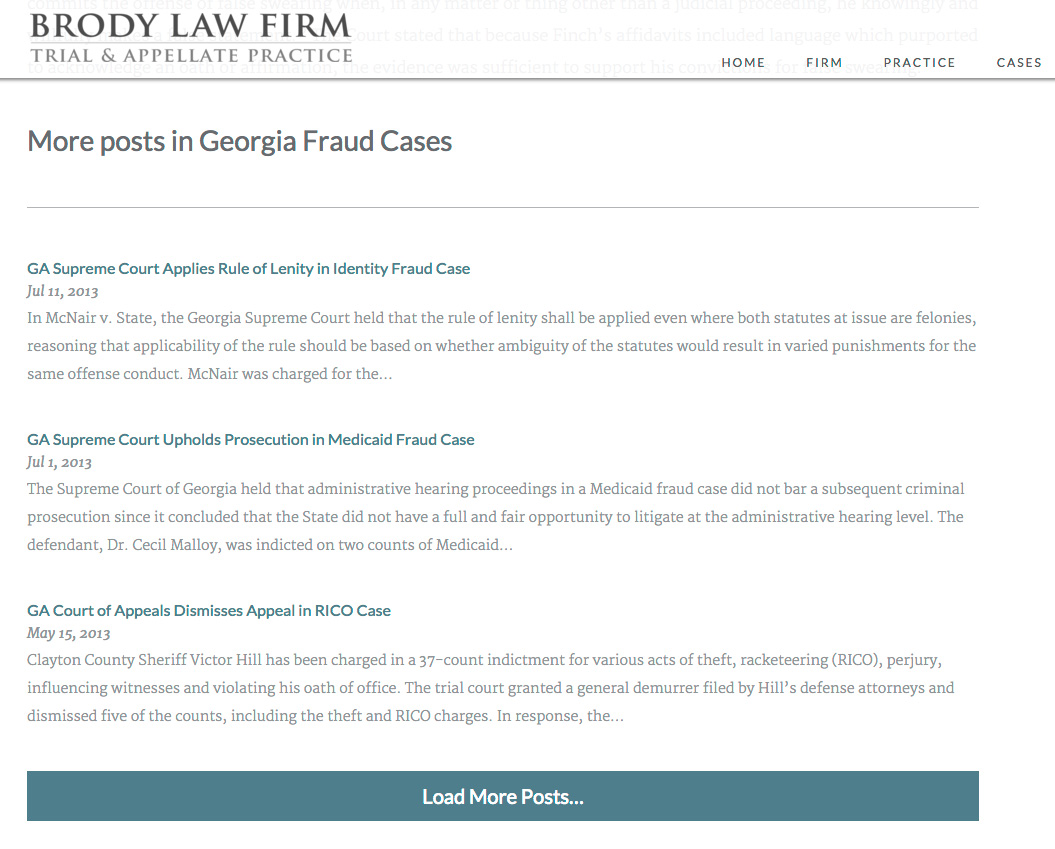
On Brody Law Firm’s website (not live, coming soon), at the bottom of an individual post we display more posts from the same category and a button to load more. The code to power this is very similar to the above example, except we’re triggering it on click rather than on scroll.
| <?php | |
| /** | |
| * Javascript for Load More | |
| * | |
| */ | |
| function be_load_more_js() { | |
| if( ! is_singular( 'post' ) ) | |
| return; | |
| $query = array( | |
| 'post__not_in' => array( get_queried_object_id() ), | |
| 'category_name' => ea_first_term( 'category', 'slug' ), | |
| 'posts_per_page' => 3 | |
| ); | |
| $args = array( | |
| 'url' => admin_url( 'admin-ajax.php' ), | |
| 'query' => $query, | |
| ); | |
| wp_enqueue_script( 'be-load-more', get_stylesheet_directory_uri() . '/js/load-more.js', array( 'jquery' ), '1.0', true ); | |
| wp_localize_script( 'be-load-more', 'beloadmore', $args ); | |
| } | |
| add_action( 'wp_enqueue_scripts', 'be_load_more_js' ); | |
| /** | |
| * AJAX Load More | |
| * | |
| */ | |
| function be_ajax_load_more() { | |
| $args = isset( $_POST['query'] ) ? array_map( 'esc_attr', $_POST['query'] ) : array(); | |
| $args['post_type'] = isset( $args['post_type'] ) ? esc_attr( $args['post_type'] ) : 'post'; | |
| $args['paged'] = esc_attr( $_POST['page'] ); | |
| $args['post_status'] = 'publish'; | |
| ob_start(); | |
| $loop = new WP_Query( $args ); | |
| if( $loop->have_posts() ): while( $loop->have_posts() ): $loop->the_post(); | |
| be_post_summary(); | |
| endwhile; endif; wp_reset_postdata(); | |
| $data = ob_get_clean(); | |
| wp_send_json_success( $data ); | |
| wp_die(); | |
| } | |
| add_action( 'wp_ajax_be_ajax_load_more', 'be_ajax_load_more' ); | |
| add_action( 'wp_ajax_nopriv_be_ajax_load_more', 'be_ajax_load_more' ); | |
| /** | |
| * First Term | |
| * Helper Function | |
| */ | |
| function ea_first_term( $taxonomy, $field ) { | |
| $terms = get_the_terms( get_the_ID(), $taxonomy ); | |
| if( empty( $terms ) || is_wp_error( $terms ) ) | |
| return false; | |
| // If there's only one term, use that | |
| if( 1 == count( $terms ) ) { | |
| $term = array_shift( $terms ); | |
| } else { | |
| $term = array_shift( $list ); | |
| } | |
| // Output | |
| if( $field && isset( $term->$field ) ) | |
| return $term->$field; | |
| else | |
| return $term; | |
| } |
| jQuery(function($){ | |
| $('.post-listing').append( '<span class="load-more">Click here to load earlier stories</span>' ); | |
| var button = $('.post-listing .load-more'); | |
| var page = 2; | |
| var loading = false; | |
| $('body').on('click', '.load-more', function(){ | |
| if( ! loading ) { | |
| loading = true; | |
| var data = { | |
| action: 'be_ajax_load_more', | |
| page: page, | |
| query: beloadmore.query, | |
| }; | |
| $.post(beloadmore.url, data, function(res) { | |
| if( res.success) { | |
| $('.post-listing').append( res.data ); | |
| $('.post-listing').append( button ); | |
| page = page + 1; | |
| loading = false; | |
| } else { | |
| // console.log(res); | |
| } | |
| }).fail(function(xhr, textStatus, e) { | |
| // console.log(xhr.responseText); | |
| }); | |
| } | |
| }); | |
| }); |
I’m only enqueuing this script on single posts. For the query, we’re requesting posts in the same category, excluding the current post. Also note how the Javascript file triggers the AJAX query when the .load-more element is clicked, rather than on scroll.
Any Questions?
I hope this in-depth tutorial helps you implement infinite scroll in your own projects.

Daniel says
Hey,
I wrote something pretty similar, checking whether others like you have implemented nonce check for infinity scroll / Ajax carts and other “non-data-critical” applications. Thing is, when caching pages, it gets pretty nasty as everyone is getting the same nonce hence loosing its value. I was wondering whether anyone was going forward on loosing the nonces and use a GET request instead. What are your thoughts on this?
Regards,
Shaa Taylor says
Thanks you for this code and explanation, it works perfectly and does exactly what i am looking for. Now I can decide how to display the extra data on the page. This is important as how I display the posts that come back is quite complicated and no infinite scroll WP plugin has been able to do what I want.
Thanks Bill, this is super cool!
AG says
Hi,
I want to implement Western Journalism example on my wordpress website – homepage.
I am little lost and need your help. When I follow the instructions you have given above – I receive an error for line 19 in JS File – Anonymous. What do I need to do? Also what is admin-ajax.php and where can I find it?
Thanks
AG says
This didnt work for me 🙁 I receive an error in my js.
Lefteris says
For those who are trying to use this solution on a masonry grid:
Items on the masonry use absolute positioning so appending the button in the container will not work. You either need to use another method to detect the bottom of the window ($(window).scrollTop() + $(window).height() > $(document).height() – 100) or append the button in the parent element.
Then add this modified version of the load-more.js https://gist.github.com/FutureMedia/e3a4220b4ac623301be98ee36d062bf6
Panos says
How about to load more items when the user scrolls close to the bottom and not on click of the load more posts button? How can this be done?
Bill Erickson says
That’s exactly what the first part of this tutorial does – “Scroll to Load More”
Núria says
Very usefull and functional code, thanks for it. I implemented it with success.
But now I’m trying to add a preload gif, using the class .load-more:
.load-more {
background: url(“../images/preload.gif”) no-repeat;
display: inline-block;
width: 128px;
height: 15px;
}
It’s running ok, but I don’t know where in the js script get the end of the data loaded to change the display of the .load-more to none, and hide it at the end of all posts loaded.
Any idea? Thanks in advance!
Giovanni Ganzinotti says
I am trying to solve this exact problem. Did you find a solution?
John says
Wow, super easy to implement and really good explained for people with beginner coding skills. Thanks for this Article, a big time saver and a good read to learn how to infinite scroll if you’re not just a Copy Cat.
John says
Now I am having a little trouble with getting this to work, while having the Main Query modified with WP_query, so the WordPress Frontpage adds a Custom Post Type to the regular Posts.
The Script always just returns “0” and when I do a console.log on the query inside the data array, its empty.
Any recommendations on how to modify your script so it works with that too?
Bill Erickson says
In the `be_load_more_js()` function (hooked to wp_enqueue_scripts) the query parameters are added to the $args array. Do a print_r( $args ); to make sure those query arguments match your desired query.
If that looks right, the next step is to see how it’s processed. Temporarily copy this code into the be_load_more_js() function (this came from be_ajax_load_more() ): https://gist.github.com/billerickson/b85243965c4e1231bb74750a2f0719a7 After you load it once, you’ll see how the arguments were processed in be_ajax_load_more() and confirm they look correct.
Just continue troubleshooting down the line until you find the issue.
Julien says
Hey Bill! Great tutorial by the way. I really appreciate what you share.
I’m having the same issue as John where I keep getting “0” in my console.
Here is what print_r( $args ); is giving me: “Array ( [nonce] => 479bf315ea [url] => http://alifeworthliving.xyz/wp-admin/admin-ajax.php [query] => Array ( [page] => [pagename] => videos ) )”.
I’m not sure where to go from here. I also looked at: https://codex.wordpress.org/AJAX_in_Plugins#Error_Return_Values – and understand that the returned “0” means that the wordpress hook is not connecting to the admin-ajax.php… Let me know your thoughts!
Julien says
Hi Bill, no worries I got this figured out.
Jordan says
Hey Julien – what did you do to figure this out? I am having the same problem.
Giovanni Ganzinotti says
Wonderful tutorial. I was able to implement this piece of code on my index.php. (http://ganzinotti.com/business). Now I want to continue to add the functionality on other pages.
For example: http://ganzinotti.com/business/books/ has a different style so I need to change the the code.
Another example: http://ganzinotti.com/business/custom-posts/ here I need to include other custom post types.
How can I easily extend your code without duplicating it? Conditional statements like is_home() are not working in functions.php and I do not want to duplicate the code, because I need eight different formats.
Hopefully you can give me a hint.
Doug says
Just wanted to say thanks for this. Things weren’t very clear to me at first because somehow I was totally unaware of wp_localize_script, which is just flat-out awesome. I was able to adapt this to do exactly what I needed and it’s working great.