Infinite scroll, when used correctly, is a wonderful tool for improving engagement on your website. You lower your users’ barrier to getting the next page of content, which increases their chances to find something interesting and click through.
I refer to infinite scrolling as any technique that uses AJAX to load additional content without reloading the page. I’ll provide a general walkthrough of the tools required, then provide two examples of different implementations.
Summary
There are three main components to infinite scroll.
- The trigger. This is what starts the loading of new content. It is typically scroll-based (ex: load more posts when users is X pixels from bottom of page) or click-based (ex: clicking a “load more” button)
- The AJAX query. This is the Javascript actually asking for the new content, and then inserting it into the page.
- The WordPress query. The PHP code in your theme or plugin that does a WP Query, formats the data, and returns it when asked by the AJAX query.
Scroll to Load More
The first example is a standard “Scroll to Load More”. When the user is a certain distance from the end of the post listing, more posts are loaded and inserted at the bottom. I implemented this on Western Journalism.

The WordPress Query
When you create your AJAX query, you’ll specify an action (see load-more.js, line 23). You’ll then hook a WordPress function to that action, and it will get run any time that AJAX query runs.
The hooks you use are wp_ajax_{action} and wp_ajax_nopriv_{action}. Let’s call our action “be_ajax_load_more”, and we’d hook our function like so:
| <?php | |
| /** | |
| * AJAX Load More | |
| * @link http://www.billerickson.net/infinite-scroll-in-wordpress | |
| */ | |
| function be_ajax_load_more() { | |
| $data = 'Additional posts go here'; | |
| wp_send_json_success( $data ); | |
| wp_die(); | |
| } | |
| add_action( 'wp_ajax_be_ajax_load_more', 'be_ajax_load_more' ); | |
| add_action( 'wp_ajax_nopriv_be_ajax_load_more', 'be_ajax_load_more' ); |
You’ll pass useful data to your function using the $_POST variable. Here’s a full example of the WordPress query. We’re grabbing query variables from $_POST, doing the query, and returning the result. I’m using a function called be_post_summary() to output the individual post. You’ll need to define this function yourself so it outputs the post formatted the way you’d like.
| <?php | |
| /** | |
| * AJAX Load More | |
| * @link http://www.billerickson.net/infinite-scroll-in-wordpress | |
| */ | |
| function be_ajax_load_more() { | |
| $args = isset( $_POST['query'] ) ? array_map( 'esc_attr', $_POST['query'] ) : array(); | |
| $args['post_type'] = isset( $args['post_type'] ) ? esc_attr( $args['post_type'] ) : 'post'; | |
| $args['paged'] = esc_attr( $_POST['page'] ); | |
| $args['post_status'] = 'publish'; | |
| ob_start(); | |
| $loop = new WP_Query( $args ); | |
| if( $loop->have_posts() ): while( $loop->have_posts() ): $loop->the_post(); | |
| be_post_summary(); | |
| endwhile; endif; wp_reset_postdata(); | |
| $data = ob_get_clean(); | |
| wp_send_json_success( $data ); | |
| wp_die(); | |
| } | |
| add_action( 'wp_ajax_be_ajax_load_more', 'be_ajax_load_more' ); | |
| add_action( 'wp_ajax_nopriv_be_ajax_load_more', 'be_ajax_load_more' ); |
Enqueue the Javascript
We need to enqueue a Javascript file which will contain all our relevant JS. We also need to pass along the information our WordPress plugin needs using wp_localize_script().
| <?php | |
| /** | |
| * Javascript for Load More | |
| * | |
| */ | |
| function be_load_more_js() { | |
| global $wp_query; | |
| $args = array( | |
| 'url' => admin_url( 'admin-ajax.php' ), | |
| 'query' => $wp_query->query, | |
| ); | |
| wp_enqueue_script( 'be-load-more', get_stylesheet_directory_uri() . '/js/load-more.js', array( 'jquery' ), '1.0', true ); | |
| wp_localize_script( 'be-load-more', 'beloadmore', $args ); | |
| } | |
| add_action( 'wp_enqueue_scripts', 'be_load_more_js' ); |
In this example I’m also passing along the URL for the AJAX query and the current WordPress query so that we can use it when requesting additional posts.
Setup the Javascript
Now it’s time for the actual Javascript file. In my theme I created a /js directory and load-more.js inside it. You can name and place your file anywhere, but make sure the wp_enqueue_script() above properly links to it. Below the code snippet I’ll walk through what’s happening line-by-line.
| jQuery(function($){ | |
| $('.post-listing').append( '<span class="load-more"></span>' ); | |
| var button = $('.post-listing .load-more'); | |
| var page = 2; | |
| var loading = false; | |
| var scrollHandling = { | |
| allow: true, | |
| reallow: function() { | |
| scrollHandling.allow = true; | |
| }, | |
| delay: 400 //(milliseconds) adjust to the highest acceptable value | |
| }; | |
| $(window).scroll(function(){ | |
| if( ! loading && scrollHandling.allow ) { | |
| scrollHandling.allow = false; | |
| setTimeout(scrollHandling.reallow, scrollHandling.delay); | |
| var offset = $(button).offset().top - $(window).scrollTop(); | |
| if( 2000 > offset ) { | |
| loading = true; | |
| var data = { | |
| action: 'be_ajax_load_more', | |
| page: page, | |
| query: beloadmore.query, | |
| }; | |
| $.post(beloadmore.url, data, function(res) { | |
| if( res.success) { | |
| $('.post-listing').append( res.data ); | |
| $('.post-listing').append( button ); | |
| page = page + 1; | |
| loading = false; | |
| } else { | |
| // console.log(res); | |
| } | |
| }).fail(function(xhr, textStatus, e) { | |
| // console.log(xhr.responseText); | |
| }); | |
| } | |
| } | |
| }); | |
| }); |
3-4 I’m creating an element with a class of .load-more and sticking it at the bottom of my post container (.post-listing). We’ll detect how far away the user is from this element to determine when to load more posts
5-6 Create some variables we’ll need. Setting page = 2 since we’ll be loading the second page. The loading variable will tell us if we’re actively waiting for the next set of posts, so we don’t send multiple requests.
7-13 Instead of running the next block of code every microsecond the user is scrolling, I’m setting up a timer. When scrolling, it is only allowed to check every 400 microseconds (this can be adjusted if needed).
15 If the user is scrolling…
16 And we’re not already loading posts, and the timer will let us check…
17-18 Reset the timer
19 Calculate distance between the window’s current location and the .load-more element
20 If we’re within 2000px of the .load-more element…
21 Set loading to true since we’re about to load new posts
22-27 Setup the data we’re passing to our WP function. We’re including the action, the page we want to load, and the other query variables.
28 Make the AJAX request to the proper AJAX URL and pass along our data
29-33 If the AJAX request is successful, stick the returned data at the bottom of our post container, then move the .load-more element below it (resetting the distance between the window and the button). Increase our page count (so next time we’ll get page 3), and set loading to false.
34-36 If we don’t get a success message back, do nothing (for now). Uncomment the console.log line and whatever information is received will be displayed in your browser’s console.
37-39 If it fails, do nothing (for now). Like above, you can uncomment the console.log for more details about what went wrong.
And that’s it! We now have infinite scroll working on archive pages. For reference, here’s the full code
Infinite Scroll – Click to Load More
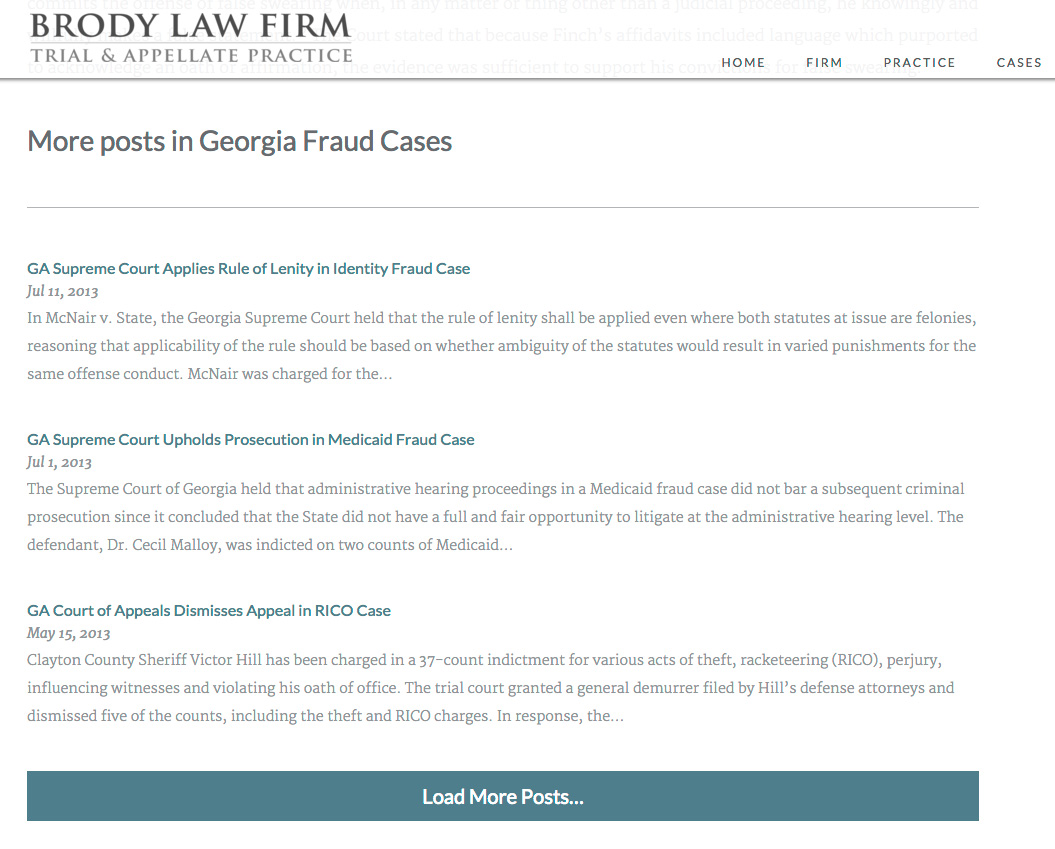
On Brody Law Firm’s website (not live, coming soon), at the bottom of an individual post we display more posts from the same category and a button to load more. The code to power this is very similar to the above example, except we’re triggering it on click rather than on scroll.
| <?php | |
| /** | |
| * Javascript for Load More | |
| * | |
| */ | |
| function be_load_more_js() { | |
| if( ! is_singular( 'post' ) ) | |
| return; | |
| $query = array( | |
| 'post__not_in' => array( get_queried_object_id() ), | |
| 'category_name' => ea_first_term( 'category', 'slug' ), | |
| 'posts_per_page' => 3 | |
| ); | |
| $args = array( | |
| 'url' => admin_url( 'admin-ajax.php' ), | |
| 'query' => $query, | |
| ); | |
| wp_enqueue_script( 'be-load-more', get_stylesheet_directory_uri() . '/js/load-more.js', array( 'jquery' ), '1.0', true ); | |
| wp_localize_script( 'be-load-more', 'beloadmore', $args ); | |
| } | |
| add_action( 'wp_enqueue_scripts', 'be_load_more_js' ); | |
| /** | |
| * AJAX Load More | |
| * | |
| */ | |
| function be_ajax_load_more() { | |
| $args = isset( $_POST['query'] ) ? array_map( 'esc_attr', $_POST['query'] ) : array(); | |
| $args['post_type'] = isset( $args['post_type'] ) ? esc_attr( $args['post_type'] ) : 'post'; | |
| $args['paged'] = esc_attr( $_POST['page'] ); | |
| $args['post_status'] = 'publish'; | |
| ob_start(); | |
| $loop = new WP_Query( $args ); | |
| if( $loop->have_posts() ): while( $loop->have_posts() ): $loop->the_post(); | |
| be_post_summary(); | |
| endwhile; endif; wp_reset_postdata(); | |
| $data = ob_get_clean(); | |
| wp_send_json_success( $data ); | |
| wp_die(); | |
| } | |
| add_action( 'wp_ajax_be_ajax_load_more', 'be_ajax_load_more' ); | |
| add_action( 'wp_ajax_nopriv_be_ajax_load_more', 'be_ajax_load_more' ); | |
| /** | |
| * First Term | |
| * Helper Function | |
| */ | |
| function ea_first_term( $taxonomy, $field ) { | |
| $terms = get_the_terms( get_the_ID(), $taxonomy ); | |
| if( empty( $terms ) || is_wp_error( $terms ) ) | |
| return false; | |
| // If there's only one term, use that | |
| if( 1 == count( $terms ) ) { | |
| $term = array_shift( $terms ); | |
| } else { | |
| $term = array_shift( $list ); | |
| } | |
| // Output | |
| if( $field && isset( $term->$field ) ) | |
| return $term->$field; | |
| else | |
| return $term; | |
| } |
| jQuery(function($){ | |
| $('.post-listing').append( '<span class="load-more">Click here to load earlier stories</span>' ); | |
| var button = $('.post-listing .load-more'); | |
| var page = 2; | |
| var loading = false; | |
| $('body').on('click', '.load-more', function(){ | |
| if( ! loading ) { | |
| loading = true; | |
| var data = { | |
| action: 'be_ajax_load_more', | |
| page: page, | |
| query: beloadmore.query, | |
| }; | |
| $.post(beloadmore.url, data, function(res) { | |
| if( res.success) { | |
| $('.post-listing').append( res.data ); | |
| $('.post-listing').append( button ); | |
| page = page + 1; | |
| loading = false; | |
| } else { | |
| // console.log(res); | |
| } | |
| }).fail(function(xhr, textStatus, e) { | |
| // console.log(xhr.responseText); | |
| }); | |
| } | |
| }); | |
| }); |
I’m only enqueuing this script on single posts. For the query, we’re requesting posts in the same category, excluding the current post. Also note how the Javascript file triggers the AJAX query when the .load-more element is clicked, rather than on scroll.
Any Questions?
I hope this in-depth tutorial helps you implement infinite scroll in your own projects.

Tom says
Thanks for posting this! — I’ve just been looking at trying similar with Masonry. What would you recommend for taking the AJAX a step further to load entire posts in the background for presentation in a modal window or lightbox?
Bill Erickson says
I’d use the same approach outlined here. Just update the WP function to return the markup you need (full post content rather than excerpts).
eliseo says
Fantastic, Interesting, Regards
Amber Hinds says
Thanks for sharing, Bill! I was wondering about this after looking at Pinch of Yum. Is the footer-cta on that site hooked a widget area in with the query in be_ajax_load_more()?
Bill Erickson says
Yes, in my load more function I display 20 posts and then the footer-cta. It’s not a widget area though, it’s just a function I wrote to output the footer cta.
David Chandra says
thanks for sharing.
did you ever use jetpack infinite scroll module?
it also update the URL, so it will be bookmark-able.
any idea how to do that?
Bill Erickson says
The problem with the Jetpack infinite scroll (and other plugins like it) is they have to work with every theme so use a pretty hacky approach. They actually load the next page (like clicking the “Next” link in your pagination), then pick out just the posts in the content area and insert that. You’re loading a whole page when it would be more efficient to only load the posts required.
It can also cause issues with ad networks since you’re inflating your pageviews. Infinite scroll is a “pageview” when Jetpack loads the page to grab the posts, but the ad shown on that page isn’t seen by an actual human.
Finally, with that tool you’re limited to only archive pages since they have the “Next” button Jetpack can press. The approach described above can be used in any instance. When you’re on a single post you can load excerpts of other posts, like I’ve done on Pinch of Yum.
If you wanted to change the URL you could use pushState/replaceState, or history.js to ensure it works in all browsers.
David Chandra says
I agree. this solution is more flexible and optimized than using plugin to handle it.
thanks for all the info.
But i’m pretty sure you need to use
die();in your ajax callback?or maybe https://codex.wordpress.org/Function_Reference/wp_die
Bill Erickson says
Good catch! I’ve updated the code snippets above.
Scott Lesovic says
In other AJAX-y things I’ve done, I’ve needed to refresh the nonce on every iteration. Is that just not needed here, or is it missing?
Bill Erickson says
I don’t believe we need to regenerate the nonce, but it probably wouldn’t hurt.
From the Codex: “Nor are they used only once, but have a limited “lifetime” after which they expire. During that time period the same nonce will be generated for a given user in a given context. The nonce for that action will remain the same for that user until that nonce life cycle has completed.”
Lorie Ransom says
Thanks for this! I recently implemented my first Ajax functionality based on another tutorial, but didn’t know about using nonces for it. I’ve now added that in!
Ihab says
I worked through your tutorial through my theme. Called function using be_ajax_load_more(); as template tag and all I got as output is “-1”. Any suggestions?
Bill Erickson says
From what’s given it’s hard to tell where the issue lies. You might try uncommenting the console.log lines in the JS and then looking in the browser’s console to see what is actually being returned.
Ihab says
I did uncomment consol.log lines and checked. Browser console returned noting!
Daniel says
Check this link https://codex.wordpress.org/AJAX_in_Plugins#Error_Return_Values
John says
I had the same issue, any luck?
John says
AH… The reason I got -1 was because I call the function be_ajax_load_more() directly on my page. It is not necessary because we already executed the function in the function.php add_action().
Rasheed R says
Thanks for this post! Very well constructed and easy to follow even for a nOOb like myself 🙂
Question – have you ever tried the Ajax Load More (https://wordpress.org/plugins/ajax-load-more/) plugin?
Bill Erickson says
No, I have not tried that plugin. It looks interesting, but I still prefer the method outlined above. It’s simpler to make it match the look and feel of your site when you’re using the same functions to display posts on load and on scroll.
Ahmed says
Do you know that infinite scroll doesn’t work with google DFP?
Bill Erickson says
I’ve never heard that. My clients haven’t had trouble implementing their ads with infinite scroll. It’s actually one of the main reasons we use infinite scroll – to keep people on the page, looking at content so we can get more ads in front of them.
In Google’s DoubleClick for Publishers documentation, the first advanced example is infinite scroll.
Gunter says
First of all thanx for sharing your code, very helpful!
But on question, I wonder why I’m the first asking, I get an error 500 if I leave the “be_post_summary()” within the loop, it’s not a known function, what is this function supposed to do?
Is it necessary for the functionality?
thx in advance
Bill Erickson says
You are supposed to replace that function with whatever you want to display. In my example I had a function, be_post_summary(), that outputs a summary of blog posts.