This tutorial is designed for intermediate developers. It will get you started, but you’ll need to tweak the template files to your own needs.
A few of the StudioPress child themes include a portfolio page, like Modern Portfolio and Jane. But what if you’ve found a theme you want and it doesn’t include this feature?
It’s actually not that difficult to add to any theme. And even if your theme already includes it, this plugin-based approach will ensure your portfolio will keep working when it comes time to change themes.
An Integrated Approach
Just like Event Calendar Integration, this is a feature that should be built using a plugin and your theme.
The plugin contains the functionality: registering a “portfolio” post type, a “portfolio categories” taxonomy, any necessary metaboxes…all of the backend features that should be theme-independent and stay with you when you change themes in the future.
The theme is responsible for styling how the portfolio looks. If you don’t make any changes to your theme, the portfolio will look like another blog (because it will inherit the styling from that section). In the future if you change themes, you’ll want to update the design of that theme with regards to your portfolio.
Set up the backend
 Install the Portfolio Post Type plugin. This will add a “Portfolio” post type below your “Posts”.
Add your portfolio items, making sure to add images for each one so the layout looks good in the next step.
If you go to yoursite.com/portfolio, you’ll see all your portfolio items showing up but it looks like a blog – just title and post content.
Styling your Portfolio
Create a theme file called archive-portfolio.php and place it in your child theme. Place this code in it:
| <?php | |
| /** | |
| * Portfolio Archive | |
| * | |
| */ | |
| /** | |
| * Display as Columns | |
| * | |
| */ | |
| function be_portfolio_post_class( $classes ) { | |
| global $wp_query; | |
| if( !$wp_query->is_main_query() ) | |
| return $classes; | |
| $columns = 3; | |
| $column_classes = array( '', '', 'one-half', 'one-third', 'one-fourth', 'one-fifth', 'one-sixth' ); | |
| $classes[] = $column_classes[$columns]; | |
| if( 0 == $wp_query->current_post % $columns ) | |
| $classes[] = 'first'; | |
| return $classes; | |
| } | |
| add_filter( 'post_class', 'be_portfolio_post_class' ); | |
| // Remove items from loop | |
| remove_action( 'genesis_entry_header', 'genesis_post_info', 12 ); | |
| remove_action( 'genesis_entry_content', 'genesis_do_post_content' ); | |
| remove_action( 'genesis_entry_footer', 'genesis_entry_footer_markup_open', 5 ); | |
| remove_action( 'genesis_entry_footer', 'genesis_post_meta' ); | |
| remove_action( 'genesis_entry_footer', 'genesis_entry_footer_markup_close', 15 ); | |
| /** | |
| * Add Portfolio Image | |
| * | |
| */ | |
| function be_portfolio_image() { | |
| echo wpautop( '<a href="' . get_permalink() . '">' . genesis_get_image( array( 'size' => 'medium' ) ). '</a>' ); | |
| } | |
| add_action( 'genesis_entry_content', 'be_portfolio_image' ); | |
| add_filter( 'genesis_pre_get_option_content_archive_thumbnail', '__return_false' ); | |
| // Move Title below Image | |
| remove_action( 'genesis_entry_header', 'genesis_entry_header_markup_open', 5 ); | |
| remove_action( 'genesis_entry_header', 'genesis_entry_header_markup_close', 15 ); | |
| remove_action( 'genesis_entry_header', 'genesis_do_post_title' ); | |
| add_action( 'genesis_entry_footer', 'genesis_entry_header_markup_open', 5 ); | |
| add_action( 'genesis_entry_footer', 'genesis_entry_header_markup_close', 15 ); | |
| add_action( 'genesis_entry_footer', 'genesis_do_post_title' ); | |
| genesis(); |
The first secton of code is breaking the portfolio into columns. Change the
$columns = 3 to however many columns you want (2-6). If your portfolio is not showing up in multiple columns, your theme might be missing the Column Classes CSS. Go to that link and copy/paste the CSS to your style.css file.
The second section is removing items we don’t want showing up in the loop. I’m removing the post info (date and author at top), post content, and post meta (categories at bottom). I’m also removing the markup for the entry’s footer since we no longer have a footer.
The third section is adding an image to replace the post content. I’m using the medium image size, which you can manage in Settings > Media. You might also consider creating your own image size in functions.php.
The fourth section moves the post title below the featured image.
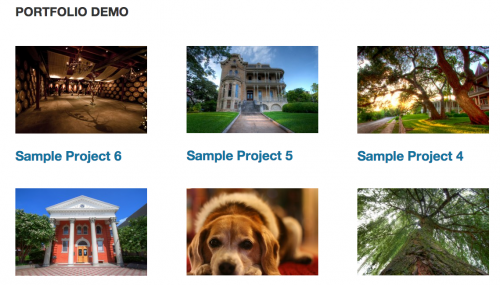
With that in place, you should have a pretty good portfolio set up. You might want to do some additional styling or changes to the template file, but now you have a starting point. Here’s what it looks like on my demo site:
Use same template for taxonomies
The plugin includes Portfolio Categories and Portfolio Tags taxonomies. You could duplicate the template file into taxonomy-portfolio_category.php and taxonomy-portfolio_tag.php, but that means if you make changes in the future you’ll need to update 3 files.
A cleaner approach is to put this in functions.php:
| <?php | |
| /** | |
| * Portfolio Template for Taxonomies | |
| * | |
| */ | |
| function be_portfolio_template( $template ) { | |
| if( is_tax( array( 'portfolio_category', 'portfolio_tag' ) ) ) | |
| $template = get_query_template( 'archive-portfolio' ); | |
| return $template; | |
| } | |
| add_filter( 'template_include', 'be_portfolio_template' ); |
That tells WordPress “if we’re on either the portfolio category or portfolio tag taxonomies, use the portfolio archive template file”.
Ordering projects
Right now the projects are showing up in reverse chronological order – the most recently published are at the top. But since this is a portfolio, you might want to put your most impressive projects at the top, regardless of post date.
Add this to your functions.php file:
| <?php | |
| /** | |
| * Add 'page-attributes' to Portfolio Post Type | |
| * | |
| * @param array $args, arguments passed to register_post_type | |
| * @return array $args | |
| */ | |
| function be_portfolio_post_type_args( $args ) { | |
| $args['supports'][] = 'page-attributes'; | |
| return $args; | |
| } | |
| add_filter( 'portfolioposttype_args', 'be_portfolio_post_type_args' ); | |
| /** | |
| * Sort projects by menu order | |
| * | |
| */ | |
| function be_portfolio_query( $query ) { | |
| if( $query->is_main_query() && !is_admin() && ( is_post_type_archive( 'portfolio' ) || is_tax( array( 'portfolio_category', 'portfolio_tag' ) ) ) ) { | |
| $query->set( 'orderby', 'menu_order' ); | |
| $query->set( 'order', 'ASC' ); | |
| } | |
| } | |
| add_action( 'pre_get_posts', 'be_portfolio_query' ); |
You can now use the “Page Attributes” box in the right column when editing a portfolio item to set the order, or install a plugin like Simple Page Ordering which will let you drag them around from the main portfolio edit screen.

Jesse says
How do you make the images clickable?
Bill Erickson says
Look at Line 40 in the “Styling Your Portfolio” section. The img tag is being wrapped with a link to the individual project.
Cara says
Hi there,
I’m wondering if there is a way to display category pages with a sidebar instead of as a full width page. Also is there a way to display the category title at the top of the category page? Any thoughts are welcome. Thanks
Cara says
Sorry, one more question. Is there a way to make the images link to an item on a category page?
Thanks,
Cara
Henk van den Bor says
Recently I found out that most of the portfolio archive pages that are created like this are not getting a nice search result in Google (e.g. https://www.google.nl/?gws_rd=ssl#q=http:%2F%2Fwww.billerickson.net%2Fprojects%2F&safe=off)
I have tried to get a more relevant description by starting the portfolio with a bit of text, but Google just does not pick it up… also when using Yoast’s seo and adding a custom description to the page.
I used a function to insert the text before the post_content, but it looks like Google wants it inside the content div… (The site is pre html 5)
When I look at the google result for your /projects page I see a part of the text from the contact form wrapper … without a clear clue as to why this is considered to be the most relevant content for the description that Google uses..
Does anyone have an idea as to how to insert a good description that will be used by Google?
Bill Erickson says
I have my portfolio archive and individual projects set to noindex, so they don’t show up when someone searches for a client’s site. So I don’t care too much about what Google knows about the page.
I would expect that setting the meta description would help, especially on a portfolio like mine that has no text.
Henk van den Bor says
Thing is that i created the portfolio page a few years ago, with the method Genesis then used (and a few of your tips as extra’s 🙂 )
I set it up to work under the term ‘massage-chairs’ now it turns out to be the highest ranking page when searching for ‘massage-chairs’. It displays the posts in the category “massage chairs’.
I tried, setting the meta-description in categories, setting the seo description with Yoast, setting the archive-intro, setting all of those on the page that uses the ‘massage-chairs’ template….
Still Google does not pick up any-one of those, and the nagging bit of it is that I do not understand why this is happening… 🙂
Jamie Mitchell says
Did you try creating a site map? and making sure the post types are in it.
I can’t seem to remember the exact details but i did have a similar issue on a project, and i created a site map and made sure those post type categories where it is then submitted the site map to google. At the time it seem to work.
msa2301 says
Hy there !
i want to show specific portfolio on multiple pages. like there are 3 pages CLIENTS, Completed projects, current projects . so how can i do this can you plzz tell me ?
Bill Erickson says
See this comment as an example: https://www.billerickson.net/genesis-portfolio/#comment-89028
Val Lynn says
Thank you Bill for sharing this and for being present in the comments! Thank you also to Sridhar Katakam and Robin Cornett.
[Using genesis] I created a custom page template to display my portfolio items and wanted to combine a normal “page” with the addition of the portfolio like Robin (http://robincornett.com/portfolio/). I was hoping to do this “natively” through a page template (so I could use that page template anywhere on my site) but could not get the portfolio to display in a grid beneath the page text (that flowed full width). I solved the problem in a roundabout way by reading Sridhar Katakam’s http://sridharkatakam.com/single-archive-templates-custom-post-type-genesis/ specifically this section //* [Dashboard] Add Archive Settings option to Books CPT
add_post_type_support( ‘books’, ‘genesis-cpt-archives-settings’ );
Is there a way to have the portfolio display in column format beneath *any* wordpress page through the creation of a custom page template without using the Archive Settings?
Bill Erickson says
If you’re doing a custom query on a page template, you’ll need to handle the HTML markup yourself. You can’t use the post_class() function since it is for the main query. In other words, if you were to use the post_class filter to break your custom loop into columns, it would break the main page content at the top into columns as well.
Your page template should look something like this: https://gist.github.com/billerickson/b9a660dcf197d507eaa7
Val says
ACK! Oh boy, that certainly does exactly what I wanted. Now I can employ this custom page template and not have to have the same archive text on every page. The text an be pulled from the page itself.
Brilliant. Thank you Bill.
Lang says
Will this work with a responsive design?
Bill Erickson says
Yes
Jonathan says
He,
Working here http://sparklinginnovation.nl/portfolio
I have added a few categories to my portfolio posts, but they will not with the post_meta filter. It looks like they are not registered.
Any idea what the problem is?
Bill Erickson says
My guess is you’re using a custom taxonomy like portfolio_category, not the built-in ‘category’ taxonomy that’s applied to posts. For custom taxonomies, use
[post_terms taxonomy="portfolio_category"]Jonathan says
He Bill,
But where do I put that?
In functions.php?
Can you help me with the code?
Bill Erickson says
That goes in your post_meta filter, replacing [post_categories]
I’m sorry but I don’t provide free support or consulting, so if you need help implementing it I recommend you hire someone on Codeable.io
Phil says
hi Bill
thanks for the tutorial — i added the archive-portfolio.php and have the columns set to 3.
i added 4 test Portfolio items to a category called Products and created a menu link to that category in the top menu. But the Category is displaying each item individually and not in a nice grid as you had it.
I have the column classes in place in the CSS
[in terms of other plugins i have running I have GENESIS GRID but deactivating that did not resolve the issue]
any idea why the category is not displaying in a 3 column layout?
thanks
Phil
Bill Erickson says
Did you include the code above under “Same template for taxonomies”? If so, make sure the taxonomy name in that code matches the taxonomy you’re using.
Also, this code needs to go in functions.php, not the archive-portfolio.php file with the rest of the code mentioned in this post.
Phil says
Thanks Bill
yes this is what i added to functions.php
/**
* Add ‘page-attributes’ to Portfolio Post Type
*
* @param array $args, arguments passed to register_post_type
* @return array $args
*/
function be_portfolio_post_type_args( $args ) {
$args[‘supports’][] = ‘page-attributes’;
return $args;
}
add_filter( ‘portfolioposttype_args’, ‘be_portfolio_post_type_args’ );
/**
* Sort projects by menu order
*
*/
function be_portfolio_query( $query ) {
if( $query->is_main_query() && !is_admin() && ( is_post_type_archive( ‘portfolio’ ) || is_tax( array( ‘portfolio_category’, ‘portfolio_tag’ ) ) ) ) {
$query->set( ‘orderby’, ‘menu_order’ );
$query->set( ‘order’, ‘ASC’ );
}
}
add_action( ‘pre_get_posts’, ‘be_portfolio_query’ );
/**
* Portfolio Template for Taxonomies
*
*/
function be_portfolio_template( $template ) {
if( is_tax( array( ‘portfolio_category’, ‘portfolio_tag’ ) ) )
$template = get_query_template( ‘archive-portfolio’ );
return $template;
}
add_filter( ‘template_include’, ‘be_portfolio_template’ );
Bill Erickson says
I don’t see any issues in there. I’m sorry, but you’ll have to troubleshoot this yourself.