This tutorial is designed for intermediate developers. It will get you started, but you’ll need to tweak the template files to your own needs.
A few of the StudioPress child themes include a portfolio page, like Modern Portfolio and Jane. But what if you’ve found a theme you want and it doesn’t include this feature?
It’s actually not that difficult to add to any theme. And even if your theme already includes it, this plugin-based approach will ensure your portfolio will keep working when it comes time to change themes.
An Integrated Approach
Just like Event Calendar Integration, this is a feature that should be built using a plugin and your theme.
The plugin contains the functionality: registering a “portfolio” post type, a “portfolio categories” taxonomy, any necessary metaboxes…all of the backend features that should be theme-independent and stay with you when you change themes in the future.
The theme is responsible for styling how the portfolio looks. If you don’t make any changes to your theme, the portfolio will look like another blog (because it will inherit the styling from that section). In the future if you change themes, you’ll want to update the design of that theme with regards to your portfolio.
Set up the backend
 Install the Portfolio Post Type plugin. This will add a “Portfolio” post type below your “Posts”.
Add your portfolio items, making sure to add images for each one so the layout looks good in the next step.
If you go to yoursite.com/portfolio, you’ll see all your portfolio items showing up but it looks like a blog – just title and post content.
Styling your Portfolio
Create a theme file called archive-portfolio.php and place it in your child theme. Place this code in it:
| <?php | |
| /** | |
| * Portfolio Archive | |
| * | |
| */ | |
| /** | |
| * Display as Columns | |
| * | |
| */ | |
| function be_portfolio_post_class( $classes ) { | |
| global $wp_query; | |
| if( !$wp_query->is_main_query() ) | |
| return $classes; | |
| $columns = 3; | |
| $column_classes = array( '', '', 'one-half', 'one-third', 'one-fourth', 'one-fifth', 'one-sixth' ); | |
| $classes[] = $column_classes[$columns]; | |
| if( 0 == $wp_query->current_post % $columns ) | |
| $classes[] = 'first'; | |
| return $classes; | |
| } | |
| add_filter( 'post_class', 'be_portfolio_post_class' ); | |
| // Remove items from loop | |
| remove_action( 'genesis_entry_header', 'genesis_post_info', 12 ); | |
| remove_action( 'genesis_entry_content', 'genesis_do_post_content' ); | |
| remove_action( 'genesis_entry_footer', 'genesis_entry_footer_markup_open', 5 ); | |
| remove_action( 'genesis_entry_footer', 'genesis_post_meta' ); | |
| remove_action( 'genesis_entry_footer', 'genesis_entry_footer_markup_close', 15 ); | |
| /** | |
| * Add Portfolio Image | |
| * | |
| */ | |
| function be_portfolio_image() { | |
| echo wpautop( '<a href="' . get_permalink() . '">' . genesis_get_image( array( 'size' => 'medium' ) ). '</a>' ); | |
| } | |
| add_action( 'genesis_entry_content', 'be_portfolio_image' ); | |
| add_filter( 'genesis_pre_get_option_content_archive_thumbnail', '__return_false' ); | |
| // Move Title below Image | |
| remove_action( 'genesis_entry_header', 'genesis_entry_header_markup_open', 5 ); | |
| remove_action( 'genesis_entry_header', 'genesis_entry_header_markup_close', 15 ); | |
| remove_action( 'genesis_entry_header', 'genesis_do_post_title' ); | |
| add_action( 'genesis_entry_footer', 'genesis_entry_header_markup_open', 5 ); | |
| add_action( 'genesis_entry_footer', 'genesis_entry_header_markup_close', 15 ); | |
| add_action( 'genesis_entry_footer', 'genesis_do_post_title' ); | |
| genesis(); |
The first secton of code is breaking the portfolio into columns. Change the
$columns = 3 to however many columns you want (2-6). If your portfolio is not showing up in multiple columns, your theme might be missing the Column Classes CSS. Go to that link and copy/paste the CSS to your style.css file.
The second section is removing items we don’t want showing up in the loop. I’m removing the post info (date and author at top), post content, and post meta (categories at bottom). I’m also removing the markup for the entry’s footer since we no longer have a footer.
The third section is adding an image to replace the post content. I’m using the medium image size, which you can manage in Settings > Media. You might also consider creating your own image size in functions.php.
The fourth section moves the post title below the featured image.
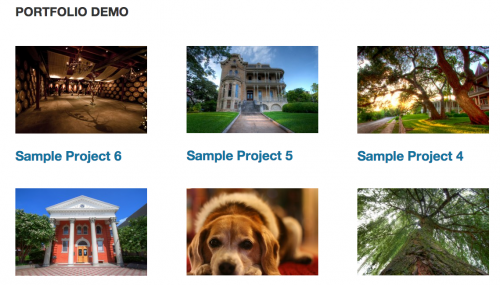
With that in place, you should have a pretty good portfolio set up. You might want to do some additional styling or changes to the template file, but now you have a starting point. Here’s what it looks like on my demo site:
Use same template for taxonomies
The plugin includes Portfolio Categories and Portfolio Tags taxonomies. You could duplicate the template file into taxonomy-portfolio_category.php and taxonomy-portfolio_tag.php, but that means if you make changes in the future you’ll need to update 3 files.
A cleaner approach is to put this in functions.php:
| <?php | |
| /** | |
| * Portfolio Template for Taxonomies | |
| * | |
| */ | |
| function be_portfolio_template( $template ) { | |
| if( is_tax( array( 'portfolio_category', 'portfolio_tag' ) ) ) | |
| $template = get_query_template( 'archive-portfolio' ); | |
| return $template; | |
| } | |
| add_filter( 'template_include', 'be_portfolio_template' ); |
That tells WordPress “if we’re on either the portfolio category or portfolio tag taxonomies, use the portfolio archive template file”.
Ordering projects
Right now the projects are showing up in reverse chronological order – the most recently published are at the top. But since this is a portfolio, you might want to put your most impressive projects at the top, regardless of post date.
Add this to your functions.php file:
| <?php | |
| /** | |
| * Add 'page-attributes' to Portfolio Post Type | |
| * | |
| * @param array $args, arguments passed to register_post_type | |
| * @return array $args | |
| */ | |
| function be_portfolio_post_type_args( $args ) { | |
| $args['supports'][] = 'page-attributes'; | |
| return $args; | |
| } | |
| add_filter( 'portfolioposttype_args', 'be_portfolio_post_type_args' ); | |
| /** | |
| * Sort projects by menu order | |
| * | |
| */ | |
| function be_portfolio_query( $query ) { | |
| if( $query->is_main_query() && !is_admin() && ( is_post_type_archive( 'portfolio' ) || is_tax( array( 'portfolio_category', 'portfolio_tag' ) ) ) ) { | |
| $query->set( 'orderby', 'menu_order' ); | |
| $query->set( 'order', 'ASC' ); | |
| } | |
| } | |
| add_action( 'pre_get_posts', 'be_portfolio_query' ); |
You can now use the “Page Attributes” box in the right column when editing a portfolio item to set the order, or install a plugin like Simple Page Ordering which will let you drag them around from the main portfolio edit screen.

Joseph says
its the text on the tab. Also when going to one of the portfolio (whats-on) items it it still reverts back to culture.com/portfolio/item
I suppose I am trying to make the whats on a parent of one of the items
Damien Carbery says
Thanks for this. I was using a page template with a custom loop to get my CPTs but then I realised that I would have issues with paging. Using your code results in paging handled automatically (I assume – the site I am working on only has 4 CPT posts so not hitting the posts_per_page limit.
Bill Erickson says
Correct, since this uses the main WP query, you have no issues with pagination.
Tim Squires says
Hi Bill,
I’m using Desktopserver and working locally on a test site while I figure this out.
I am stuck in the very early stages of the tutorial. I have added three portfolio items, but when I try to navigate to mysite.com/portfolio I get an object not found error.
This is probably something basic that I am not doing correctly, but I can’t figure it out.
Thanks for your help.
Jamie Mitchell says
Hi Tim, did you update the permalinks?
Angie says
I am trying to add more than one portfolio page to my site. I would like to have two totally separate pages that contain two different portfolio categories. I have a followed a tutorial very similar to this one to get the original portfolio page set up, but whenever I try to add a second portfolio page, it just overwrites the first one. Is having two portfolio pages not possible?
Bill Erickson says
You can’t have two content types with the same name (portfolio). And while you could go to the hassle of building two completely separate portfolios, a much better solution is to use categories.
Niki Payne says
I knew there was a way to do this. Yours was the first post I could find that showed how to do what I have been trying to do for over a month. I followed the instructions, but I’m still having styling issues. I can’t really figure out what’s wrong here. Here is what I ended up: http://nikipayne.com/portfolio/
Here are my “Gists”:
Archive-Portfolio.php – https://gist.github.com/fivepennies/a2a9635890e59f04546a
Style.css – https://gist.github.com/fivepennies/1bbdd5446f15ce81437d
Functions.php – https://gist.github.com/fivepennies/a7ebe8aa3fb72b5df77a
Tony says
Bill I am using your plugin, I don’t understand what you mean by this “Register the portfolio post type (or use the plugin) and set ‘has_archive’ => false. This will make it so there’s no portfolio page that displays all items.”
Where do I find ‘has_archive’ => false
Thanks
Bill Erickson says
This assumes you register the post type yourself using
register_post_type(). Search this page for “has_archive” for more information.Tony says
Thanks Bill, you’re the best
Tony says
I am using your plugin though
Bill Erickson says
I don’t have a portfolio plugin. If you mean the one I referenced above, that was built by Devin Price and Gary Jones.
That plugin has a filter built-in. Adding this to your theme or core functionality should fix it: https://gist.github.com/billerickson/54c015be08264240ee03
Myrna Knode says
THANK YOU! Just implemented this tutorial and working perfectly. Thank you so much Bill for the time you take putting these together. I especially appreciate how clearly and simply you explain the ‘why’ and ‘what’ behind your beautiful coding solutions. Really helps so much to have an excellent translator when you’re learning a new language 😉
Hazel L says
Thank you for this incredibly helpful post, Bill!
I have it working on this website: http://hbevents.ca/portfolio/ but I want to extend it further and create a sort of album system or sub-categories for the portfolio.
For example have it structured like this inside WordPress: https://dl.dropboxusercontent.com/u/8524824/hbevents.png so that clicking one project leads to an archive of sub-projects (or in my case, specific weddings). I’m assuming it’s possible to achieve this on Genesis but haven’t been able to find the resource.
Any help is much appreciated! Thanks again.
Bill Erickson says
Make sure the post type is hierarchical when you register it. That will make it looks like your screenshot rather than like posts.
I’d then use ‘template_include’ to point top level pages to a separate template. Something like this: https://gist.github.com/billerickson/be599a090be6d08ea0ad
You’d then use portfolio-album.php to style the album pages (top level portfolio items), and single-portfolio.php to style the individual projects (subpages of portfolio items).
AnitaC says
Hi Bill, is there a way to set the default number of portfolio items to show up? I need my home page to stay set at 3 (via Settings > Reading>, but it changes the portfolio archive to 3. I need the portfolio set to 6. Thanks in advance for your help.
Bill Erickson says
Here’s an article I wrote on customizing the main WordPress query. You’d do this on
$query->is_post_type_archive( 'portfolio' )(or whatever you’re calling your post type).AnitaC says
Thanks Bill, that’s worked perfectly.
Ivan says
Bill,
What approach you would recommend for displaying all the attached images on single.php
Seams that genesis doesn’t have built in function.thanks for all the shared knowledge.
Bill Erickson says
Add this to your theme’s single.php file: https://www.billerickson.net/code/get-attached-images/
Ivan says
Thanks. I was just looking at this last night but thought Genesis may have a built in function that I haven’t found. Thank you once again for the help.