Yoast SEO includes an incredibly powerful implementation of structured data, which is a tool search engines use to better understand your website.
They have extensive documentation for extending it, and many plugins already integrate with it. For instance, if you are using WP Recipe Maker for recipes on your site, it will add the appropriate recipe schema to your Yoast SEO schema.
Genesis already includes structured data, also known as schema markup. You don’t want duplicate schema on the page, so you should use one or the other.
If you’re using Genesis 3.1 or later, Genesis’ schema will automatically disable if Yoast SEO schema is active. If you’re using Genesis 3.0 or earlier, you can install my Disable Genesis Schema plugin.
Here are some ways you might customize your schema:
- Disable Genesis schema
- Disable Yoast SEO schema
- Use both Genesis and Yoast SEO schema
- How Genesis schema works
- How Yoast SEO schema works
Customization Options
Disable Genesis schema
Genesis will only disable its schema if Yoast SEO is active and Yoast schema is enabled.
If you’re using a different plugin to add schema data, you can disable Genesis schema by adding this to your child theme’s functions.php file:
add_filter( 'genesis_disable_microdata', '__return_true' );Plugin developers: If your plugin is outputting schema data and you’d like Genesis to automatically disable its schema, you can use the filter genesis_is_wpseo_outputting_jsonld. Here’s the relevant function from /genesis/lib/functions/seo.php.
Disable Yoast SEO schema
If you would prefer keeping Genesis’ schema data, you can disable Yoast SEO’s schema data using the following code in your child theme’s functions.php file:
add_filter( 'wpseo_json_ld_output', '__return_false' );This is a good option if you’ve already made customizations to the Genesis schema on your site and aren’t ready to rebuild that code to support Yoast’s structured data.
But if you’re like 99% of Genesis sites that haven’t modified the default schema, you’ll be better served switching over to Yoast SEO for schema data.
Use both Genesis and Yoast SEO schema
As described below in more detail, the Genesis schema describes more elements on the page than Yoast SEO.
Yoast focuses on only the schema search engines currently care about (the primary article on the page), while Genesis tries to describe all the elements on the page, like the Header, Navigation, Sidebar, Article, and Footer.
The code below will enable Genesis schema even when Yoast SEO is active, then selectively remove the Genesis schema that relates to the main article on the page.
I don’t believe there is any SEO benefit to this approach, but I’m asked how to do it often enough that I wanted to document it.
Add this code to your theme’s functions.php file:
// Tell Genesis that WP SEO is not outputting schema
add_filter( 'genesis_is_wpseo_outputting_jsonld', '__return_false' );

/**
 * Selectively Disable Genesis Schema elements
 * @author Bill Erickson
 * @see https://www.billerickson.net/yoast-schema-with-genesis/
 */
function be_selectively_disable_genesis_schema() {

	$elements = array(
		'entry',
		'entry-image',
		'entry-image-widget',
		'entry-image-grid-loop',
		'entry-author',
		'entry-author-link',
		'entry-author-name',
		'entry-time',
		'entry-modified-time',
		'entry-title',
		'entry-content',
	);

	foreach( $elements as $element ) {
		add_filter( 'genesis_attr_' . $element, 'be_remove_schema_attributes', 20 );
	}
}
add_action( 'init', 'be_selectively_disable_genesis_schema' );


/**
 * Remove schema attributes
 *
 */
function be_remove_schema_attributes( $attr ) {
	unset( $attr['itemprop'], $attr['itemtype'], $attr['itemscope'] );
	return $attr;
}
How Genesis Schema works
Genesis uses an approach called microdata, which are data attributes attached to elements already on the page to describe those elements to search engines. For instance, your post title has itemprop="headline" to tell search engines that this is the headline of the current article.
You can run into issues if you remove elements from the page because you’re also removing the schema data that’s attached to those elements. For instance, if you remove the author name from the top of the post, you also lose the structured data saying you’re the author of this post.
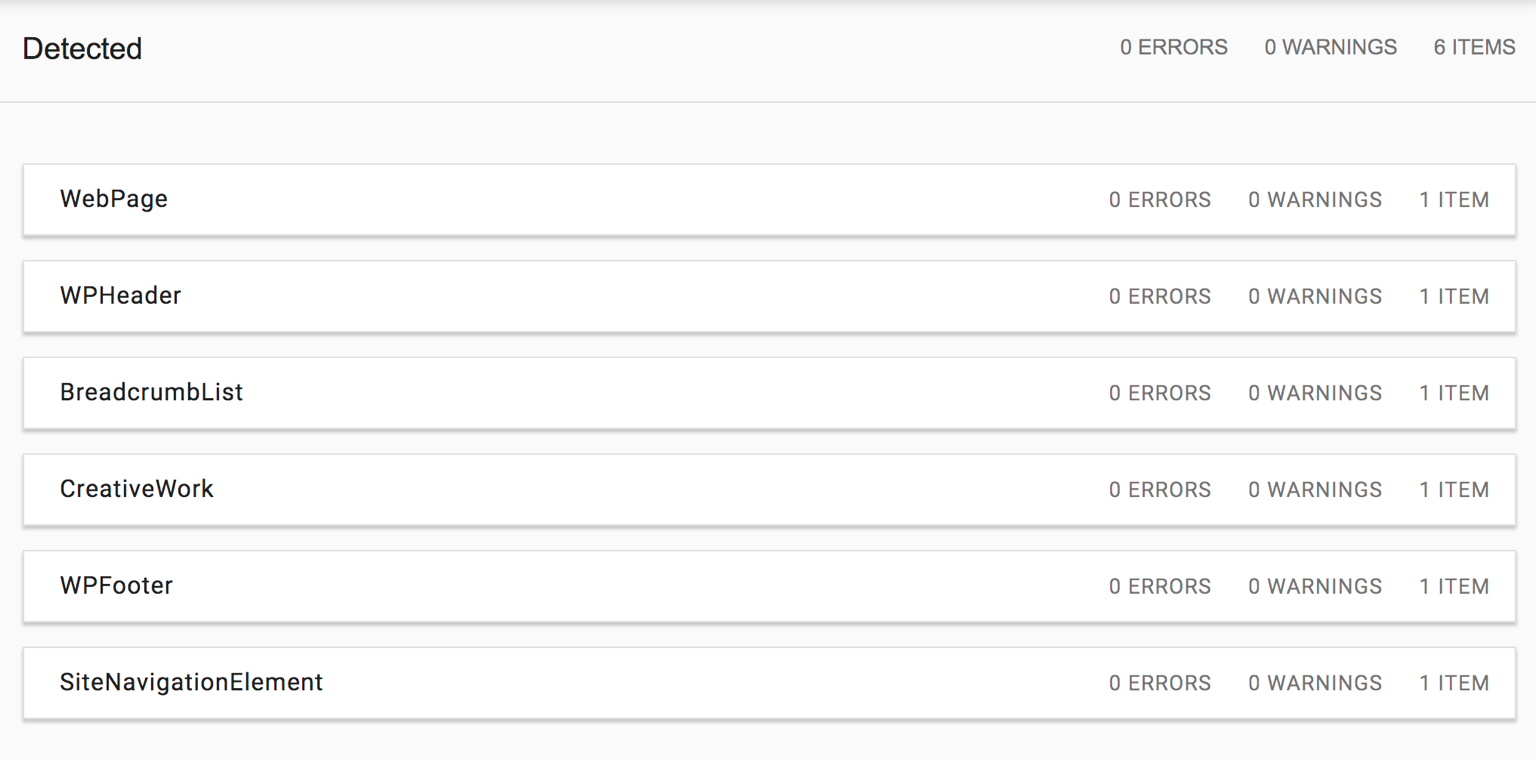
You also end up with many unconnected blocks of schema. Here’s the results of the Structured Data Testing Tool on an article on my site before the code change:
How Yoast SEO Schema works
Yoast SEO uses JSON-LD which is a newer and better approach to structured data (more information).
JSON is a lightweight method to structure data to share with search engines and others. Rather than scattering your Schema data throughout the page and making the search engine assemble it (e.g. microdata), you prepare a small block of code that tells search engines exactly what they need to know in one place.
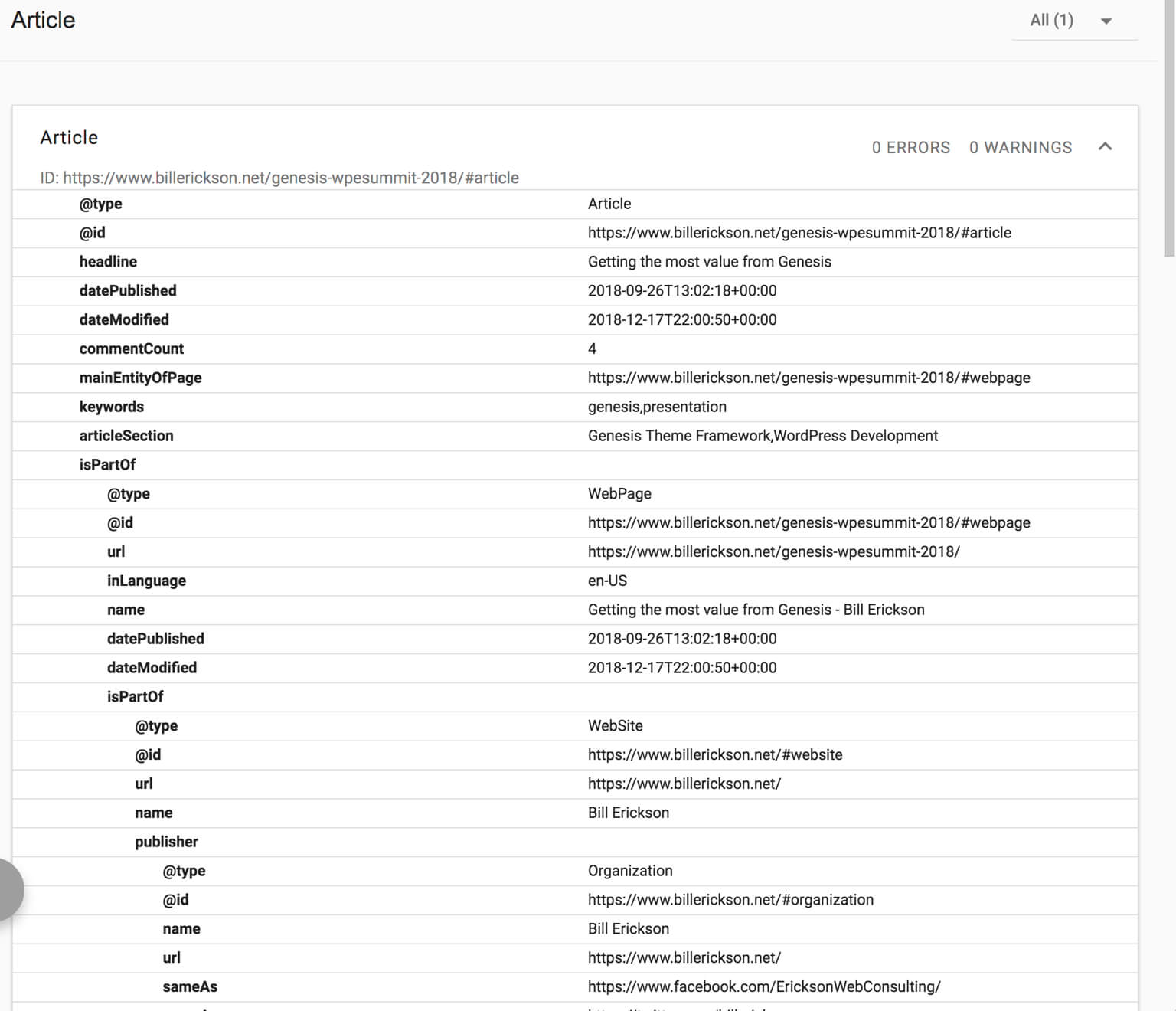
The -LD part stands for Linked Data, which means you’re able to link all of the individual schema components together. In the screenshot above you can see everything is a separate block with microdata, but with JSON-LD it would follow a hierarchical structure. The Article is part of a WebPage which is part of a WebSite.
Here’s my structured data after disabling Genesis schema and using the latest version of Yoast SEO:

App Shah says
This is great article Bill. That’s one of the reason I haven’t upgraded to newer Yoast SEO version.
I would wait for some more time before I disable Genesis Schema.
CR says
Thanks so much for this, Bill!
Would you personally recommend going with Yoast as opposed to sticking with Genesis’ built in SEO capability? I was recently researching this and I didn’t come out with a perfectly clear option.
(I hate having extra plugins but if it helps with SEO it’s probably worth it.)
Bill Erickson says
The Genesis SEO metabox is fairly basic. It only lets you customize the title and description used in search results. But if that’s all you need from an SEO plugin then it works fine.
Here are some of the features I like about Yoast SEO:
– A visual preview of how the meta title and description will look in search results
– Adds open graph tags so your content looks right when shared on Facebook and Twitter
– Ability to specify alternate title, description, and image for social sharing
– Ability to set a default social sharing image
– Automatically builds XML Sitemap
– More advanced breadcrumbs than the standard Genesis ones
– More advanced schema than Genesis
K says
Hi – as a relative newbie, do all Genesis themes have this schema markup? I am using Essence Pro.
How much slower would a webpage load using the Code Snippets Plugin for this (I’m not quite up to creating a child theme) and Yoast? I have personally preferred the cleaner look to the Genesis SEO than all of Yoast’s color/comments. Thanks!
Bill Erickson says
Yes, all modern Genesis themes include schema. If you’re using an old XHTML theme from 5+ years ago you don’t have schema, but it’s unlikely you’re using a theme that old.
I’m actually releasing this as a standalone plugin – just waiting for it to be approved by WordPress.org. Once it’s in there in the next few days, I’ll update the post and recommend installing that instead of the Code Snippets plugin.
If you’d like to use the plugin right now, click here to download it, then go to Plugins > Add New, click “Upload” at the top, and upload the zip file you downloaded.
K says
awesome. thank you.
Elise says
Thanks for the article, & for the plugin! Super useful 🙂
This not quite on topic, but I think since this past Yoast update, the “Reply” text in my comments sections no longer work on all my sites with Genesis themes. Has this happened to anyone else?
Any ideas for what I can do? Thanks so much in advance for any suggestions you can offer.
Bill Erickson says
That’s strange. You might try contacting StudioPress support or Yoast support. I can’t think of a way Yoast would affect your Reply text.
Ally says
Thank you so much for this!
Marianne says
Hi,
Thanks for this. But the link to your plugin leads to Github and not to a plugin download page. Or am I missing something?
Bill Erickson says
You can download it from GitHub right now. I’m waiting for the WordPress.org plugin to be approved, which should be later today. Once it’s approved I’ll update the links above to point there.
Suzy Handgraaf says
Thanks for this! I’m such a non-tech person. Waiting for the WordPress.org plugin link.
Bill Erickson says
I just updated it! Here’s the direct link: https://wordpress.org/plugins/disable-genesis-schema/
Suzy Handgraaf says
Thank you! Does it just do its thing or is there something I need to do other than activate the plugin?
Bill Erickson says
Simply activate and you’re done! No setup or settings required.
Just make sure you also have Yoast SEO 11 installed so you have Yoast Schema.
Laurence Norah says
Thanks very much for this Bill. Kind of crazy that Yoast would just steamroll this release out with minimal forewarning and zero settings for the end user – it’s not like Genesis is a niche theme, and I’m sure there are lots of other theme frameworks out there with their own scheme implementation.
Bill Erickson says
I’m not sure but I think Genesis is the only popular theme that has some form of schema built-in. It’s really something that belongs in an SEO plugin since it’s an ever-changing SEO feature. The Genesis schema isn’t even accurate anymore – it marks all content as CreativeWork while blog posts should be Article and pages should be WebPage.
WordPress SEO is the most popular SEO plugin, and the majority of users have no schema on their site at all. Including this by default leads to a positive improvement to a substantial portion of WordPress websites.
It’s also necessary to ensure other plugins build their schema support on top of Yoast’s framework. If it were only an opt-in feature disabled by default, very few people would turn it on, and it wouldn’t be worth it for other plugins to build on their framework – they would keep outputting their own disconnected schema as everyone does currently.
I do wish Yoast had reached out to Genesis, let them know this is coming, and recommended Genesis release an update that automatically disables Genesis schema if Yoast schema is present. I have just opened a ticket regarding this in the Genesis development area (GitHub), so we’ll see what happens.
Remkus says
Thanks for the write up and kind words, Bill! But just to clarify, we did talk to the folks from StudioPress and explained this would come when we met at WordCamp US in December last year. It just turned out to be more complicated to get synched up together over the direction of our implementation, but we did try!
Dawn says
Hi Bill,
I have Genesis breadcrumbs. So, all I have to do is update Yoast, install the plug in and that’s it? Thanks!
Bill Erickson says
Yes, all you have to do is update Yoast and install Disable Genesis Schema.
Rob says
Thanks for this Bill, appreciate it. Activated Yoast 11 on a few sites yesterday.
Hey, I just ran the structured data tool to get a snapshot of what’s happening before I install this code snipped into my personal plugins file based off yours. I’m getting 3 errors in regards to the DPS shortcodes I run on the home page to display some recent posts from specific categories.
I also use the DPS shortcodes for related posts from same categories. In some cases there are 2 categories so it spits out a row of columns of related categories when the post is in more than one category.
I’m getting an error about Multiple ItemList markups on a page are not allowed when I use more than one DPS shortcode too.
What would be the best way to approach this? Disable that output? or is there a way to tell the shortcode to only use the primary category? I dont think I saw that in your documentation about it.
Bill Erickson says
I assume you’re using this code snippet to add the ItemList markup, correct?
I just updated the snippet so you can add
disable_schema="true"to disable the schema output on your secondary shortcodes.Alternatively, you could use this version to only enable it on shortcodes that have
enable_schema="true".You can decide which approach fits your needs better: opt-in or opt-out. In either case, you should only have one ItemList on the page.
Rob says
Thank you. I’m going to have to disable it completely unfortunately as it’s my Content Aware Sidebars that’s causing the issue. I have It display related posts from the current category using DPS, but CAS is triggered for each category the post is in, so calls DPS for each one, spitting out multiple ItemList Schemas.
I HAVE implemented your new DPS transient cache though.
Thanks again Bill.
Skylar says
Great write up Bill – thanks for taking the lead on this.
Thought you’d get a kick out of this: https://developer.yoast.com/schema-org-genesis-2-0/