Advanced Custom Fields is one of the most popular methods of creating metaboxes. It provides a simple visual interface for creating the metaboxes, and the resulting metaboxes look great and are easy for clients to edit.
ACF also includes a bunch of functions you can use in your theme to retrieve the values of the meta fields. But I recommend you don’t use these.
For some fields like images, this will introduce additional database queries. See the comment below where switching from ACF functions to the WP core function decreased database queries from 146 to 22!
There’s is no reason to use an ACF function like get_field() when you can use a WordPress core function like get_post_meta(). Using these ACF functions introduces what I’m calling “frontend dependency”.
If you use an ACF field and the ACF plugin is removed or deactivated (because clients…), visitors to the website will see the white screen of death instead of the website. If you go to the bother of wrapping all the ACF functions in function_exists(), the site will load but none of your metadata will be shown.
But the metadata still exists in the WordPress database. If you had used WordPress functions, there would be no changes to the frontend of the website. On the backend the metaboxes would be gone so they couldn’t edit those fields (unless they use the WP built-in Custom Fields metabox), but this is a much less serious issue than a broken website.
I’ve also found that ACF can cause performance issues on the frontend, even if you’re not using their fields. You can add this code to prevent the plugin from loading on the frontend.
This works fine for simple fields, but it might not be clear how the more complex fields are stored in the database. I’ll walk you through some examples.
Repeating Fields
On this page, as many videos can be included as they like (or none at all). I’m using a repeater field which includes a Title, Video URL and Thumbnail (sample fields).
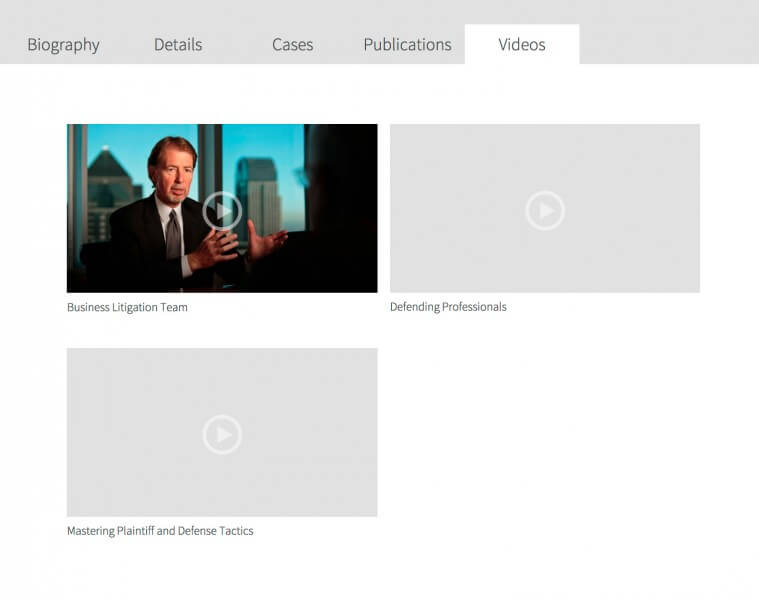
In your theme, if you look at the meta field for the repeater field ( get_post_meta( get_the_ID(), 'be_attorney_video', true ); ), it will give you the number of items within that field. You can then loop through and access all of them. Here’s how I’m assembling those videos:
| <?php | |
| $videos = get_post_meta( get_the_ID(), 'be_attorney_video', true ); | |
| if( $videos ) { | |
| for( $i = 0; $i < $videos; $i++ ) { | |
| $title = esc_html( get_post_meta( get_the_ID(), 'be_attorney_video_' . $i . '_title', true ) ); | |
| $video = esc_url( get_post_meta( get_the_ID(), 'be_attorney_video_' . $i . '_video', true ) ); | |
| $thumbnail = (int) get_post_meta( get_the_ID(), 'be_attorney_video_' . $i . '_thumbnail', true ); | |
| // Thumbnail field returns image ID, so grab image. If none provided, use default image | |
| $thumbnail = $thumbnail ? wp_get_attachment_image( $thumbnail, 'be_video' ) : '<img src="' . get_stylesheet_directory_uri() . '/images/default-video.png" />'; | |
| // Displayed in two columns, so using column classes | |
| $class = 0 == $i || 0 == $i % 2 ? 'one-half first' : 'one-half'; | |
| // Build the video box | |
| echo '<div class="' . $class . '"><a href="' . $video . '">' . $thumbnail . '</a>' . $title . '</div>'; | |
| } | |
| } |
This snippet also shows you how to use ACF image fields. They store the image ID, so you can get the actual image markup using wp_get_attachment_image( $image_id, 'image_size' );.
Flexible Content
In my last post I described setting up the HTML markup for Full Width Landing Pages. This section is a bit like “Part 2” of that post, since almost every page I set up in that way I’m using ACF’s Flexible Content field to populate the content area.

Flexible Content allows you to create different layouts, which are collections of fields. For instance, a Testimonial layout might have fields for Quote, Person’s Name, and a Photo. A website editor can then create a page by assembling these layouts in whatever order they like, and use them as many times as they like.
Take a look at the OutboundEngine homepage. The header contains a menu and call to action (graphic, text and form). The footer is the dark blue part at the bottom starting with “Sign up and watch your business grow”. Everything in between is the flexible content area. This page is made up of the following layouts: Features, Small Quote, Full Width Content, and Full Width Content.
For this example, my Flexible Content field has a name (meta_key) of ‘be_content’. I have two layouts: full width content (fields: title and content) and content with image (fields: title, content, image). Assuming you set up your page template like I did in my Full Width Landing Pages tutorial, this would be your template-landing.php file:
| <?php | |
| /** | |
| * Your Child Theme | |
| * | |
| * Template Name: Landing | |
| */ | |
| /** | |
| * Flexible Content | |
| * | |
| */ | |
| function be_landing_page_content() { | |
| $rows = get_post_meta( get_the_ID(), 'be_content', true ); | |
| foreach( (array) $rows as $count => $row ) { | |
| switch( $row ) { | |
| // Full Width Content layout | |
| case 'full_width_content': | |
| $title = esc_html( get_post_meta( get_the_ID(), 'be_content_' . $count . '_title', true ) ); | |
| $content = get_post_meta( get_the_ID(), 'be_content_' . $count . '_content', true ); | |
| echo '<div class="flex-content full-width-content"><div class="wrap">'; | |
| if( $title ) | |
| echo '<h2>' . $title . '</h2>'; | |
| if( $content ) | |
| echo '<div class="section-content">' . apply_filters( 'the_content', $content ) . '</div>'; | |
| echo '</div></div>'; | |
| break; | |
| // Content with Image layout | |
| case 'content_with_image': | |
| $title = esc_html( get_post_meta( get_the_ID(), 'be_content_' . $count . '_title', true ) ); | |
| $content = get_post_meta( get_the_ID(), 'be_content_' . $count . '_content', true ); | |
| $image = get_post_meta( get_the_ID(), 'be_content_' . $count . '_image', true ); | |
| echo '<div class="flex-content content-with-image"><div class="wrap">'; | |
| if( $title ) | |
| echo '<h2>' . $title . '</h2>'; | |
| if( $image ) | |
| echo '<div class="section-image">' . wp_get_attachment_image( $image, 'medium' ) . '</div>'; | |
| if( $content ) | |
| echo '<div class="section-content">' . apply_filters( 'the_content', $content ) . '</div>'; | |
| echo '</div></div>'; | |
| break; | |
| } | |
| } | |
| } | |
| add_action( 'be_content_area', 'be_landing_page_content' ); | |
| // Remove 'site-inner' from structural wrap | |
| add_theme_support( 'genesis-structural-wraps', array( 'header', 'footer-widgets', 'footer' ) ); | |
| // Build the page | |
| get_header(); | |
| do_action( 'be_content_area' ); | |
| get_footer(); |
The ‘be_content’ meta field will be an array of layouts used on this page, in order. The fields in each layout will be stored based on that order. So if you have a field named ‘title’ and it’s in the first layout on the page, it will be stored as ‘be_content_0_title’ (counting starts at 0, so the first one is 0).
Options Pages
Metaboxes you add to options pages will store data as options instead of post meta. It will be the meta_key you specify, prefixed with ‘options_’. So, if you had an options page with a Call to Action box (sample fields), you would access those fields like this:
| <?php | |
| function be_call_to_action() { | |
| $title = esc_html( get_option( 'options_be_cta_title' ) ); | |
| $button_text = esc_html( get_option( 'options_be_cta_button_text' ) ); | |
| $button_url = esc_url( get_option( 'options_be_cta_button_url' ) ); | |
| if( $title && $button_text && $button_url ) | |
| echo '<div class="call-to-action"><div class="wrap"><p>' . $title . '</p><p><a href="' . $button_url . '" class="button">' . $button_text . '</a></p></div></div>'; | |
| } | |
| add_action( 'genesis_before_footer', 'be_call_to_action' ); |
Term Metadata
Let’s say you added a Subtitle field to categories (sample fields). ACF stores these as options as well, with the following format: [taxonomy]_[term_id]_[field name]
So with a field name of ‘be_subtitle’, you’d use the following to access it on a category archive page:
| <?php | |
| /** | |
| * Category Subtitle | |
| * | |
| */ | |
| function be_category_subtitle() { | |
| // Make sure this is a category archive | |
| if( ! is_category() ) | |
| return; | |
| $category = get_term_by( 'slug', get_query_var( 'category_name' ), 'category' ); | |
| $subtitle = esc_html( get_option( 'category_' . $category->term_id . '_be_subtitle' ) ); | |
| if( $subtitle ) | |
| echo '<p class="subtitle">' . $subtitle . '</p>'; | |
| } | |
| add_action( 'genesis_before_loop', 'be_category_subtitle' ); |

Rachel says
I’ve been loving ACF lately and I hadn’t realized you could use post meta! I mean, it makes sense because that’s all it is – post meta that ACF arranges nicely for you on the dash, but I can’t believe this never occurred to me.
Thanks for the enlightenment. Much appreciated. I’ll def give this a try soon. 🙂
C R says
Thanks so much for your blog and article. I find them so enlightening and helpful as I work my way through WordPress and Genesis. And I admire your willingness to take time to help others! (Your responses to comments are awesome!)
In general- for a home page with different sections- would you normally make a widgeted home page or would you use ACF or CMF? I’m just trying to understand when to use what..
Bill Erickson says
I would definitely build it with metaboxes on the homepage (either ACF or CMB).
In my opinion, widget areas should only be used for sitewide (or sectionwide) content. A sidebar is the same across the whole site, so it makes sense to manage it in a specific area. But page specific content belongs on the Edit Page screen.
I hate seeing themes that have 20 or 30 widget areas to control the content of different pages. That’s a poor user experience.
C R says
Makes so much sense! (It does make me wonder why widgetized home pages are so popular..)
Thank you!
Bill Erickson says
I think they’re popular with commercial themes since it leverages built-in WP functionality. It’s simpler to build and less likely to conflict with something else.
That’s one of the reasons I like building individual sites for clients where I can set up everything for them, as opposed to selling a theme and hoping they can set it up themselves. I can do it the *right* way and make sure all dependencies are taken care of.
Sushant says
Hey Bill,
Nice one, I have been playing around with the ACF and repeater addon and was able to implement things as I wanted to. I now am working this one project, where I need to implement a custom fields on front end that too with repeating attribute and once they are submitted they should also reflect with in back end. Its like with each of the posts, I need to provide ACF on front end and when admin checks it should come with exact same fields filled with the information which was submitted from front end. And one more important thing, these fields will appear for specific members only (those do not have access to back end).
I was able to call out the fields with user login validation but not able to implement repeater out there. I keep getting errors, would it be possible for you to look in to the code? I can share in next comment.
Thanks in advance.
Bill Erickson says
I’ve never attempted to use ACF on the frontend like that. I always use Gravity Forms for frontend submissions.
Sarah says
Thanks for the post! I’m considering moving to using CMB2 from ACF.
Had a quick look at the docs and it seems that the CMB2 library handles sanitizing/escaping of data – am I right? Presumably though there would be cases where you’d still escape on output – depending on context? Would be useful to know how you handle this…
Thanks!
Bill Erickson says
Yes, when adding a field you can specify the type of sanitation you’d like done. For instance, when registering a text field that will hold a url, you could add ‘sanitization_cb’ => ‘esc_url’. Or you could pass your own function to write a custom sanitization function for that specific field.
It will be up to you to escape it on output.
$url = esc_url( get_post_meta( get_the_ID(), 'be_website_url', true ) );Sarah says
Great, thanks for the clarification.
Jim Camomile says
I am very confused or maybe just missing the point. I am not sure why you would esc_url here since this is input rather than output. Wouldn’t be better to use a kses filter (sanitize on input, escape on output )?
Bill Erickson says
Because if you have a URL field and you just run it through kses, a non-url-formatted value can be saved. Using esc_url() on input ensures only a URL gets saved.
Kevin says
I have figured out how to take away the dependency for much of my uses of the ACF plugin, thanks a ton!…
I am having trouble with the Gallery field. Simply I would ask how to get and echo the url/src, alt, and caption for each image as it loops through the “for each” listed on the doc page of the gallery field: http://www.advancedcustomfields.com/resources/gallery/
My gist here shows what I have, if you could kindly take a gander and guide me in the right direction. Thanks so much as always.
https://gist.github.com/KTPH/2f78cfa01b04777b9e61
Note: the code on the gist is not working, it just shows what I was trying to get working 😉
I am thinking I am missing how to parse each piece from the ACF Gallery image array, such as the url, caption and alt…
Kevin says
I left a comment/question about how to remove front end dependency for the ACF Gallery plugin/field… I worked through the issues on a clear head and several cups of joe. Below is a gist to the working code. Let me know if you see any critical issues and thanks so much:
https://gist.github.com/KTPH/2f78cfa01b04777b9e61
BenM says
Excellent suggestion, but how do you replace get_field_object() to retrieve all the values for a custom field ?
Values are stored in a post (so in wp_posts). If you don’t use this post, you probably need a sql query.
Bill Erickson says
I’ve never needed to access the field metadata before. Can you provide a use case?
I guess you could use it to pull in the available choices of a select field, but I still don’t see how that would be necessary in the theme. I just escape the output.
Jon Brown says
The use case is exactly that. Often I need to output a field label, not the field value.
$field = get_field_object(‘jobtitle’);
$value = $field[‘value’];
$label = $field[‘choices’][ $value ];
//$value might be “vp”
//$label might be “Vice Presiedent”
ACF’s functions do a lot of error checking and “formatting” of what gets returned by get_field_object() depending on the type of field… So this remains one thing I still use ACF functions for, even though I occasionally look for an alternative like I was today.
Matt Whiteley says
Hey Bill,
Great article.
What are your thoughts on simply including ACF in the theme itself (http://www.advancedcustomfields.com/resources/including-acf-in-a-plugin-theme/) and continuing to use the ACF get_field functions and the like?
This would remove the dependency issue as the plugin would be directly integrated in to the theme so the user wouldn’t be able to disable it. This has been my workflow recently with ACF for this specific reason. It also removes the need to wrap each function in the ‘function_exists’.
Love the blog and all that you do for the WP Community.
Cheers,
Matt
Bill Erickson says
That’s a good approach and I’ve done that on a few projects. My main concern with it though is ACF wouldn’t get updated, so unless you are keeping up with it you could end up with unpatched bugs.
Matt Whiteley says
Ahh…excellent point. I suppose get_post_meta is the only fail-safe way to do it and I’ll probably make the switch back. Thanks again!
Henry Reith says
Hi Bill,
This is a fantastic post thank you. I have referenced it a lot over the last few months while working on new projects to make sure my sites won’t fall over if ACF is uninstalled.
However, I have struggled with one thing, if I place the PHP export from ACF inside a mu-plugin it doesn’t show up. I guess this doesn’t because the ACF functionality hasn’t been activated before the mu-plugin. Is this something you have come up against before?
Bill Erickson says
My guess is you can place it in a mu-plugin, but you’ll need to wrap it in a function that’s hooked to ‘init’ or ‘plugins_loaded’ so that your function runs after ACF is set up.
Walter says
Is there a way to sanitize the output of the wysiwyg editor in CMB2? In this case it contains an image added from the media library. It seems that you could separate them into separate fields using a file upload field and esc_url() and then a text field, but that negates the convenience of adding media through the wysiwyg editor for the end user.
Bill Erickson says
Typically for wysiwyg’s you sanitize on input using
wp_kses_post(). You could usewp_kses_post()on output as well, but it’s commonly thought that this will cause performance issues. Here’s some real data onwp_ksesperformance.