Advanced Custom Fields is one of the most popular methods of creating metaboxes. It provides a simple visual interface for creating the metaboxes, and the resulting metaboxes look great and are easy for clients to edit.
ACF also includes a bunch of functions you can use in your theme to retrieve the values of the meta fields. But I recommend you don’t use these.
For some fields like images, this will introduce additional database queries. See the comment below where switching from ACF functions to the WP core function decreased database queries from 146 to 22!
There’s is no reason to use an ACF function like get_field() when you can use a WordPress core function like get_post_meta(). Using these ACF functions introduces what I’m calling “frontend dependency”.
If you use an ACF field and the ACF plugin is removed or deactivated (because clients…), visitors to the website will see the white screen of death instead of the website. If you go to the bother of wrapping all the ACF functions in function_exists(), the site will load but none of your metadata will be shown.
But the metadata still exists in the WordPress database. If you had used WordPress functions, there would be no changes to the frontend of the website. On the backend the metaboxes would be gone so they couldn’t edit those fields (unless they use the WP built-in Custom Fields metabox), but this is a much less serious issue than a broken website.
I’ve also found that ACF can cause performance issues on the frontend, even if you’re not using their fields. You can add this code to prevent the plugin from loading on the frontend.
This works fine for simple fields, but it might not be clear how the more complex fields are stored in the database. I’ll walk you through some examples.
Repeating Fields
On this page, as many videos can be included as they like (or none at all). I’m using a repeater field which includes a Title, Video URL and Thumbnail (sample fields).
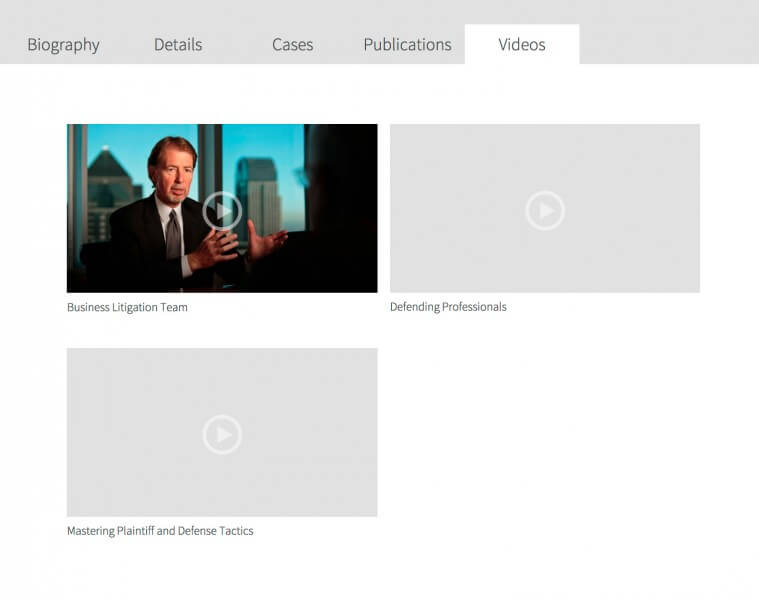
In your theme, if you look at the meta field for the repeater field ( get_post_meta( get_the_ID(), 'be_attorney_video', true ); ), it will give you the number of items within that field. You can then loop through and access all of them. Here’s how I’m assembling those videos:
| <?php | |
| $videos = get_post_meta( get_the_ID(), 'be_attorney_video', true ); | |
| if( $videos ) { | |
| for( $i = 0; $i < $videos; $i++ ) { | |
| $title = esc_html( get_post_meta( get_the_ID(), 'be_attorney_video_' . $i . '_title', true ) ); | |
| $video = esc_url( get_post_meta( get_the_ID(), 'be_attorney_video_' . $i . '_video', true ) ); | |
| $thumbnail = (int) get_post_meta( get_the_ID(), 'be_attorney_video_' . $i . '_thumbnail', true ); | |
| // Thumbnail field returns image ID, so grab image. If none provided, use default image | |
| $thumbnail = $thumbnail ? wp_get_attachment_image( $thumbnail, 'be_video' ) : '<img src="' . get_stylesheet_directory_uri() . '/images/default-video.png" />'; | |
| // Displayed in two columns, so using column classes | |
| $class = 0 == $i || 0 == $i % 2 ? 'one-half first' : 'one-half'; | |
| // Build the video box | |
| echo '<div class="' . $class . '"><a href="' . $video . '">' . $thumbnail . '</a>' . $title . '</div>'; | |
| } | |
| } |
This snippet also shows you how to use ACF image fields. They store the image ID, so you can get the actual image markup using wp_get_attachment_image( $image_id, 'image_size' );.
Flexible Content
In my last post I described setting up the HTML markup for Full Width Landing Pages. This section is a bit like “Part 2” of that post, since almost every page I set up in that way I’m using ACF’s Flexible Content field to populate the content area.

Flexible Content allows you to create different layouts, which are collections of fields. For instance, a Testimonial layout might have fields for Quote, Person’s Name, and a Photo. A website editor can then create a page by assembling these layouts in whatever order they like, and use them as many times as they like.
Take a look at the OutboundEngine homepage. The header contains a menu and call to action (graphic, text and form). The footer is the dark blue part at the bottom starting with “Sign up and watch your business grow”. Everything in between is the flexible content area. This page is made up of the following layouts: Features, Small Quote, Full Width Content, and Full Width Content.
For this example, my Flexible Content field has a name (meta_key) of ‘be_content’. I have two layouts: full width content (fields: title and content) and content with image (fields: title, content, image). Assuming you set up your page template like I did in my Full Width Landing Pages tutorial, this would be your template-landing.php file:
| <?php | |
| /** | |
| * Your Child Theme | |
| * | |
| * Template Name: Landing | |
| */ | |
| /** | |
| * Flexible Content | |
| * | |
| */ | |
| function be_landing_page_content() { | |
| $rows = get_post_meta( get_the_ID(), 'be_content', true ); | |
| foreach( (array) $rows as $count => $row ) { | |
| switch( $row ) { | |
| // Full Width Content layout | |
| case 'full_width_content': | |
| $title = esc_html( get_post_meta( get_the_ID(), 'be_content_' . $count . '_title', true ) ); | |
| $content = get_post_meta( get_the_ID(), 'be_content_' . $count . '_content', true ); | |
| echo '<div class="flex-content full-width-content"><div class="wrap">'; | |
| if( $title ) | |
| echo '<h2>' . $title . '</h2>'; | |
| if( $content ) | |
| echo '<div class="section-content">' . apply_filters( 'the_content', $content ) . '</div>'; | |
| echo '</div></div>'; | |
| break; | |
| // Content with Image layout | |
| case 'content_with_image': | |
| $title = esc_html( get_post_meta( get_the_ID(), 'be_content_' . $count . '_title', true ) ); | |
| $content = get_post_meta( get_the_ID(), 'be_content_' . $count . '_content', true ); | |
| $image = get_post_meta( get_the_ID(), 'be_content_' . $count . '_image', true ); | |
| echo '<div class="flex-content content-with-image"><div class="wrap">'; | |
| if( $title ) | |
| echo '<h2>' . $title . '</h2>'; | |
| if( $image ) | |
| echo '<div class="section-image">' . wp_get_attachment_image( $image, 'medium' ) . '</div>'; | |
| if( $content ) | |
| echo '<div class="section-content">' . apply_filters( 'the_content', $content ) . '</div>'; | |
| echo '</div></div>'; | |
| break; | |
| } | |
| } | |
| } | |
| add_action( 'be_content_area', 'be_landing_page_content' ); | |
| // Remove 'site-inner' from structural wrap | |
| add_theme_support( 'genesis-structural-wraps', array( 'header', 'footer-widgets', 'footer' ) ); | |
| // Build the page | |
| get_header(); | |
| do_action( 'be_content_area' ); | |
| get_footer(); |
The ‘be_content’ meta field will be an array of layouts used on this page, in order. The fields in each layout will be stored based on that order. So if you have a field named ‘title’ and it’s in the first layout on the page, it will be stored as ‘be_content_0_title’ (counting starts at 0, so the first one is 0).
Options Pages
Metaboxes you add to options pages will store data as options instead of post meta. It will be the meta_key you specify, prefixed with ‘options_’. So, if you had an options page with a Call to Action box (sample fields), you would access those fields like this:
| <?php | |
| function be_call_to_action() { | |
| $title = esc_html( get_option( 'options_be_cta_title' ) ); | |
| $button_text = esc_html( get_option( 'options_be_cta_button_text' ) ); | |
| $button_url = esc_url( get_option( 'options_be_cta_button_url' ) ); | |
| if( $title && $button_text && $button_url ) | |
| echo '<div class="call-to-action"><div class="wrap"><p>' . $title . '</p><p><a href="' . $button_url . '" class="button">' . $button_text . '</a></p></div></div>'; | |
| } | |
| add_action( 'genesis_before_footer', 'be_call_to_action' ); |
Term Metadata
Let’s say you added a Subtitle field to categories (sample fields). ACF stores these as options as well, with the following format: [taxonomy]_[term_id]_[field name]
So with a field name of ‘be_subtitle’, you’d use the following to access it on a category archive page:
| <?php | |
| /** | |
| * Category Subtitle | |
| * | |
| */ | |
| function be_category_subtitle() { | |
| // Make sure this is a category archive | |
| if( ! is_category() ) | |
| return; | |
| $category = get_term_by( 'slug', get_query_var( 'category_name' ), 'category' ); | |
| $subtitle = esc_html( get_option( 'category_' . $category->term_id . '_be_subtitle' ) ); | |
| if( $subtitle ) | |
| echo '<p class="subtitle">' . $subtitle . '</p>'; | |
| } | |
| add_action( 'genesis_before_loop', 'be_category_subtitle' ); |

Tony Eppright says
Thanks for this, Bill! I was using ACF a lot before their update, and wondered if I would continue using them because of the major changes.
I also wondered if this was possible, but never tried it. This makes me feel a lot more comfortable!
I wonder why ACF recommends using their functions instead of the exsiting WordPress functions? Anyways, thanks so much for taking the time to share this!
Tony
Ren says
Awesome stuff, Bill. I love the ACF plugin and its API but you make a great point in favor of using get_post_meta().
I’ve been working on a new project that I wanted to incorporate some meta boxes and simple custom fields into and I was planning to use ACF but your CMB library is phenomenal and works great.
Thanks for the awesome post.
Grégoire Noyelle says
Thanks Bil
And do you use transient to save the value when you have to deal with complexe page with a lot of meta (flexible, repeater)?
Bill Erickson says
No, transients are best left for complex queries that you’re caching or external APIs that you’re calling, like latest tweets.
It would be great if ACF allowed you to store meta as a serialized array though. If you have a repeater field that has 5 sub-fields and you have 4 items in it, that’s 21 meta fields you’ve created. If you do the same repeater in CMB it’s a single meta field since CMB stores repeaters as serialized array.
Joshua says
It seems like most of this can be reproduced with CMB, just without the UI that ACF provides. Given that the front-end display of the information is all custom development, though, I would think the UI isn’t the reason to use ACF over CMB? I’m hesitant to utilize a plugin like ACF for metaboxes, for the same reason you so elegantly described: because clients… Meanwhile I can place CMB in a custom functionality plugin and feel a little better about reducing potential conflicts and user error on plugin updates.
Anyway, just wondering if there is any strong reason to use ACF over CMB in general, or just specific instances where you’ve found it’s better?
Bill Erickson says
I try to use CMB most of the time. There’s only two instances I’ve found where ACF is the better choice (since CMB doesn’t do it and would require a lot of custom coding to add support):
But my guess is the majority of people using ACF aren’t using it for these reasons, but rather for the nice backend UI for creating metaboxes. I prefer CMB, a purely code-based metabox creation, but a lot of others seem to prefer a GUI.
I probably can’t convince them to use CMB, but I can point them in the right direction when using this plugin.
Joshua says
Awesome, this is just as I thought. I love CMB and hope to have some time to debug and help out on the version 2 in the next few months (as you mentioned below, “patches are the best form of donation”).
I have a follow-up question related to your Event Calendar – it seems to me that is perfect for CMB, but I noticed that Jared Atchison contributed changes to make the metaboxes stand-alone on that one. Was this just to make it less dependent on a another project, or in anticipation for CMB2? It seems like CMB would make it more easily expandable as a template for event calendars.
Bill Erickson says
We stripped CMB out of this plugin to make the plugin itself much leaner and to allow developers to use their tool of choice to customize it. There’s a filter in there (always has been) to disable the plugin’s metabox so that you could build your own in a core functionality plugin or by using a tool like ACF.
I didn’t want to lock people into using CMB to customize the metabox. When I build with it I’ll turn off the built-in metabox and use either CMB or ACF to build a metabox with all the features I need.
Joshua says
Ah, right, I forgot about that filter. Makes sense. Thanks!
Grégoire Noyelle says
Thanks Bill
I ask you because I remember a tutorial in css-tricks where Kevin Leary use transient with ACF. You can see the project on Github
Phil says
Actually, there is a way (sort of): ACF Table Fields (https://wordpress.org/plugins/advanced-custom-fields-table-field/) stores its data in a serialized format, if I’m not mistaken.
It would be really nice to have the option for ACF to do the same, so we could use ACFs nice backend UI – it’s just much, much more elegant and customer-friendly than CMB2, IMHO, unless I’ve overlooked something somewhere.
This is a great and very useful post, even in the contest of your great and very, very use- and helpful site.
Bill Erickson says
I’ve actually stopped using ACF. I’m tired of their non-backwards-compatible changes. I switched to Carbon Fields, which is the perfect balance between developer friendly (like CMB2) and a nice looking backend UI (like ACF).
Phil says
Oh, interesting, thanks for the link!
Out of curiosity: do you use the carbon_get_post_meta functions in the frontend, or do you again work around the plugin, so to speak, to gain more independence and/or performance?
Bill Erickson says
I built my own function that uses carbon_get_post_meta, for a few reasons:
1. I’m tired of learning the data storage structures for these different plugins. I wanted to create a single function that I can change out depending on the library I use.
2. Carbon Fields can be used for post meta, term meta, user meta, theme settings, and more. There’s a bunch of carbon_* functions, and I didn’t want to remember them all.
3. I already had a custom field function (ea_cf()) which provided a shortcut for simple fields (ex: ea_cf( ‘field_name’ ) ) and formatting options for more complex ones (prepend/append text, escape output…). I wanted to leverage these features on all the field types.
4. By using my own function, I can add a fallback to get_post_meta() in case carbon fields is not active.
Stagger Lee says
Hi Bill
Can you please write those custom functions here or on Gist ? Thanks.
Jon Brown says
Thanks for this! I’ve long considered get_field() one of the stupidest function in existence… ok that’s a bit extreme.
This post however is brilliant and I’ll refer to it often for handling all the less common and more complex cases.
Bill Erickson says
Thanks! Your email inspired the post 🙂
Victor Marsala says
I just wanted to say two things: If anyone’s on their developing journey like I was, and has yet to jump onto the custom metabox train, DO it. In my opinion, CMB is the best thing to happen to WordPress since Gravity Forms and Genesis itself (ignore chronology =)
I even was one of those people who thought “Well, why not just use Custom Fields?” Like many things, it makes sense to me, and I would do it, because I understand what I’m doing. I’ve done as much on my own site. But plenty of good and intelligent people could give two hoots about entering aa variable name or even picking it out pre-made from a dropdown. Plus the variety you get in field types from CMB is both practical and professional.
This is a LIFE saver. I’ve been an on-the-books company, a D/B/A freelancer, for over a year and a half, no slouch to coding, even, and I’m just getting to this now. But this library is not only drop-dead simple, but makes you look like a genius and a bad-arse with hardly any up front work. You’re pruning and replacing, and then burping out or iterating through loops.
Recently I had a bed and breakfast site to make, and
I’m a nerd for formatting and styling information. In the sidebar for room rates, as a result, there were headers and EM tags and spans and all sorts of different font weights and colors. This client -could- get the concept of copying and pasting, and only changing the things that, well, change, like the rates themselves. But why leave it up to chance? Enter CMB to be my madlib system. I throw the fields for the rates, well-labeled, up on the side of the edit screen under the main Update box, and it comes out perfectly formatted every time on the same spot on the resulting page.
It really comes across like a custom-built WordPress just for them and their purposes. Value added without nearly as much work as it looks like it is. Allows you to charge more as well, for the time-saving and motivation-bolstering nature of what you’re giving them.
What really makes it magic for me, though, are the repeating fields. No need to go all the way into custom post types for minor pieces of information. If they’re just burning through things in an established pattern, like testimonials, you just give it a special page and let them pop ’em out. So clean and organized.
Ugh. Total nerd mode. God bless. Is there some place to donate for this?
Bill Erickson says
Love the comment!
I’m not sure about monetary donations, but CMB is currently being rebuilt from the ground up as CMB2 and patches are the best form of donation: https://github.com/webdevstudios/CMB2
Jon Brown says
Interesting… I hadn’t heard about CMB2 and am having trouble finding a “reason/goal” for the rewrite.
Any idea if it’s prepping for the core metadata UI API project?
Have you used CMB2 in production? Seems pretty complete already.
Bill Erickson says
I’m not sure why, but my guess is so that they can make some non-backwards compatible changes to it.
I haven’t used it yet, or really looked at the code much. I just got an email a few days ago that I was added to a repo 🙂
TMF says
Hi,
But how do you use get_post_meta with a shortcode?
With get_field I can still run the code (specifically – display-posts-shortcode.
T
Bill Erickson says
echo do_shortcode( get_post_meta( get_the_ID(), 'my_field', true ) );TMF says
Thanks.
T
Robin says
Thanks for this post, Bill! Took some patience but I removed all the get_field calls in a current project, including relationships, which took a bit more pondering. Appreciate your sharing your expertise!
Rachel Vane says
Thanks Bill –
Such an awesome post – it totally improves the way I use the repeater fields. This past year, as I’ve been learning to develop with Genesis and I have found myself on your site a lot. 🙂 I’ll have to dig more into CMB.
So, my question (bear with me, because it may be silly) is that when I use ACF with Genesis I use genesis_get_custom_field((‘field_name’) – would you discourage that and is it your opinion I should switch to get_post_meta() ?
Thanks!
Bill Erickson says
You won’t have any dependency issues using the Genesis function for post meta, since your Genesis child theme will only run if Genesis is active anyway. But I tend to prefer using
get_post_meta()anyway since it makes the code easier to read for non-Genesis developers.Rachel Vane says
Makes sense. Thanks!
Anne Katzeff says
I’m definitely going to try out CMB, it looks great Bill.
I’m in the same situation as Rachel: using ACF with Genesis child themes. So, what happens if we de-activate ACF with Genesis themes? Will that bring the white screen of death?
Bill Erickson says
If you use the ACF functions (like get_field() ) in your theme, you will get a white screen if ACF is not installed. The two ways around this are:
1. Don’t use ACF functions, use WP core functions ( get_post_meta() )
2. Every time you use an ACF function, wrap it in function_exists(). Ex: if( function_exists( ‘get_field’ ) get_field() … )
Anne Katzeff says
Hi Bill,
Thanks for your reply. I’ve been using ACF as you describe, without ACF functions and wrapping functions in a if {function_exists} ( ‘get_field’), etc., The snippets were found within the Genesis community. So, I’m good, phew!
I just took another peek at the ACF resources page and see the issue you are calling out for us to pay attention to. Makes sense.
Thanks again for all you do in the Genesis community!
John says
Hi Bill,
I’ve been using your technique here for a little while now, so thank you for that. I’ve never had the need to out put repeated fields of repeated fields and a possible repeater field deeper but I have a project just like that. I however cannot get that to work using the method you’ve shared here.
My approach was to write another for loop inside of the current one and use the same method output the repeater field inside the repeater field.
Am I in the right direction?
Bill Erickson says
Yes, the approach is exactly the same, just make sure you use a different variable for the counter so you don’t override the higher level one. Ex: https://gist.github.com/billerickson/0177836067dd01cee4fb
Andrei Barbuta says
Bill, since CMB2 just came out, what is your current opinion on CMB2 and ACF Pro since both of them had major updates recently (ACF v5).
Why is it one better then the other and when is which situations to use each.
Thank you.
Bill Erickson says
Personally I only use ACF for very complex metaboxes – repeating WYSIWYGs, flexible layouts, and tabs. And over time I expect CMB2 to get these features so I’ll use ACF even less.
First, CMB2 is more developer focused. It doesn’t have a backend UI for building metaboxes. Instead, you simply modify an array with the fields you’d like. See the example-functions.php file for examples. This simplifies the plugin itself, and minimizes the chances that the client will mess with the metaboxes once launched. I know you can hide the ACF menu item using filters (I do when I use it), but I prefer not using a tool that has large features that I then hide.
Since it is code-based, it’s easier to place the metabox code in a relevant location, like in your theme or plugin (as opposed to being in ACF’s plugin settings). So when I build an events plugin, I include the code registering its metabox in the plugin itself. While technically ACF gives you the ability to export fields, CMB2 is much easier to use in it’s code-based form than ACF is. ACF is really designed as a visual metabox builder with a code-based form tacked on the end.
CMB2 can be packaged in your theme or plugin. You can have multiple plugins and themes all including CMB2 and it will load the latest. So if you are working on a plugin that you plan to publicly distribute, you can safely package the CMB2 code in there so it works out of the box, as opposed to telling people to “install ACF first” or packaging ACF Lite which doesn’t update (to my knowledge). You can also install the CMB2 plugin to make sure you’re always running the most up-to-date CMB2 code, since once a plugin is built they might not release updates every time a new version of CMB2 is released.
Finally, if you plan to create metaboxes for option pages or term meta, ACF will cause a huge performance hit which CMB2 won’t. For every field or sub-field you have in ACF, it creates 2 meta fields in the database. One is the actual field (ex: ‘my_field’ ) and one is a hidden field that ACF uses internally (ex: ‘_my_field’ ). It doesn’t serialize this for option pages or term meta. So if you have a repeating text field on an options page and create 5 items in it, you’ll have 12 options stored in the DB for this (2 for the main field, 2 for each of the 5 subfields). If you use it on term meta, you’ll have 12 times however many terms you use it on. You can quickly see how this will flood your database with options.
CMB2 will store options and term meta (which are really the same thing, both in the options table) as a single, serialized array of field values. So your option page would be stored as 1 option. You would have one option for each of your terms for which you used term meta. And if you plan to have lots of term meta (or lots of terms, or both), you can use wp_large_options to store this metadata (summary: much better for performance). The options table loads on every page (options are supposed to be site-wide settings). wp_large_options creates a hidden post type and stores the term meta as post meta. This means it isn’t loaded on the page unless you actually need it. So if someone lands on your term meta page and you call your metadata, wp_large_options converts that to a get_post_meta() pulling it from the hidden post field.
Andrei Barbuta says
Thank you so much. Your response cleared a lot of stuff in my mind. I will start to get to learn CMB2 while still using ACF for current projects and move to CMB in the future. I want to get into selling themes and the performance comparisons made it clear which is the right path to take.
One more thing that I need to clarify, do you use both ACF and CMB2 on a project? For example using ACF where you need Flexible and Repeateable WYSIWYG fields and CMB2 for other stuff or you just use one? What if the client asks in the future for some improvements and he needs Flexible or Repeatable WYSIWYG and you used CMB2 for that project?
P.S. Sorry for the late reply. Lots, of changes in my life, starting to go into business on my own. Bureaucracy hit me like a brick! 🙂
Jon Brown says
You can use ACF and CMB at the same time. Generally I’d avoid doing so, but in cases like that I wouldn’t hesitate to.
Bill Erickson says
Yes, I’ve actually done this on a project recently. I used CMB for post meta, options page, term meta, and user meta. I then used ACF for a single landing page (needed the flexible layout field).
If you’re doing something complex with ACF and then need one more simple metabox, I’d probably just keep it all in ACF. But when it comes to areas like user meta, term meta and site options, I’d rather use both CMB and ACF for their strengths rather than do it with a single plugin.