Custom WordPress queries allow you to dynamically list content from your site and display it in any format you’d like. For instance, you can:
- Display related posts at the bottom of your articles
- Create a dashboard widget listing your most popular content
- Automatically display the subpages of a section of your site
How it works
When WordPress loads your blog’s homepage, it runs a query to get the most recent posts and build the homepage. We call this the main WordPress query.
In addition to the main query, you can make your own custom queries to request any content you like. We’ll use the WP_Query() class to retrieve a list of posts based on the parameters we specify. We can then loop through the results, just like the main WordPress loop.
For a full list of available parameters, see my WP_Query Arguments reference guide and the WordPress codex.
Related Posts
You’d like to add related posts at the bottom of articles to increase visitor engagement with your site. All of your posts are in one or more categories, so an easy way to find related posts is to grab 5 posts from the same category as the current one, and make sure to exclude the current post.
| <?php | |
| /** | |
| * Related Posts by category | |
| * | |
| * @author Bill Erickson | |
| * @see https://www.billerickson.net/custom-wordpress-queries/ | |
| */ | |
| function be_related_posts_by_category() { | |
| $categories = get_the_terms( get_the_ID(), 'category' ); | |
| $category = array_shift( $categories ); | |
| $loop = new WP_Query( array( | |
| 'posts_per_page' => 5, | |
| 'category_name' => $category->slug, | |
| 'post__not_in' => array( get_the_ID() ) | |
| ) ); | |
| if( $loop->have_posts() ): | |
| echo '<div class="related-posts">'; | |
| echo '<h3>Related Posts</h3>'; | |
| while( $loop->have_posts() ): $loop->the_post(); | |
| echo '<div class="related-post">'; | |
| if( has_post_thumbnail() ) | |
| echo '<a class="entry-image-link" href="' . get_permalink() . '">' . get_the_post_thumbnail( get_the_ID(), 'medium' ) . '</a>'; | |
| echo '<h5 class="entry-title"><a href="' . get_permalink() . '">' . get_the_title() . '</a></h5>'; | |
| echo '</div>'; | |
| endwhile; | |
| echo '</div>'; | |
| endif; | |
| wp_reset_postdata(); | |
| } | |
| add_action( 'genesis_after_entry', 'be_related_posts_by_category' ); |
- We’re using
get_the_terms()to get a list of all categories attached to the current post. - To keep it simple, we’re using
array_shift()to use the first category in the list if there’s more than one. For a more advanced approach, see the ea_first_term() function in my base theme. - We then run our new WordPress query with
$loop = new WP_Query();inside the WP_Query class we specify our parameters. In this case we’re asking for 5 posts in the current post’s category, and exclude the current post ID from the results. - We then run our loop. If there were posts found, output a “Related Posts” div and heading. Then for each post, include the featured image and post title, both clickable.
- Important: After we’re done with our custom query, run
wp_reset_postdata(). This resets the global post data back to the current post in the main query.
For a more advanced version of Related Posts, see my Related Posts with SearchWP article.
Popular Content
Shared Counts is a social sharing plugin that looks great and is built for performance. A nice feature is the “Most Shared Content” dashboard widget.
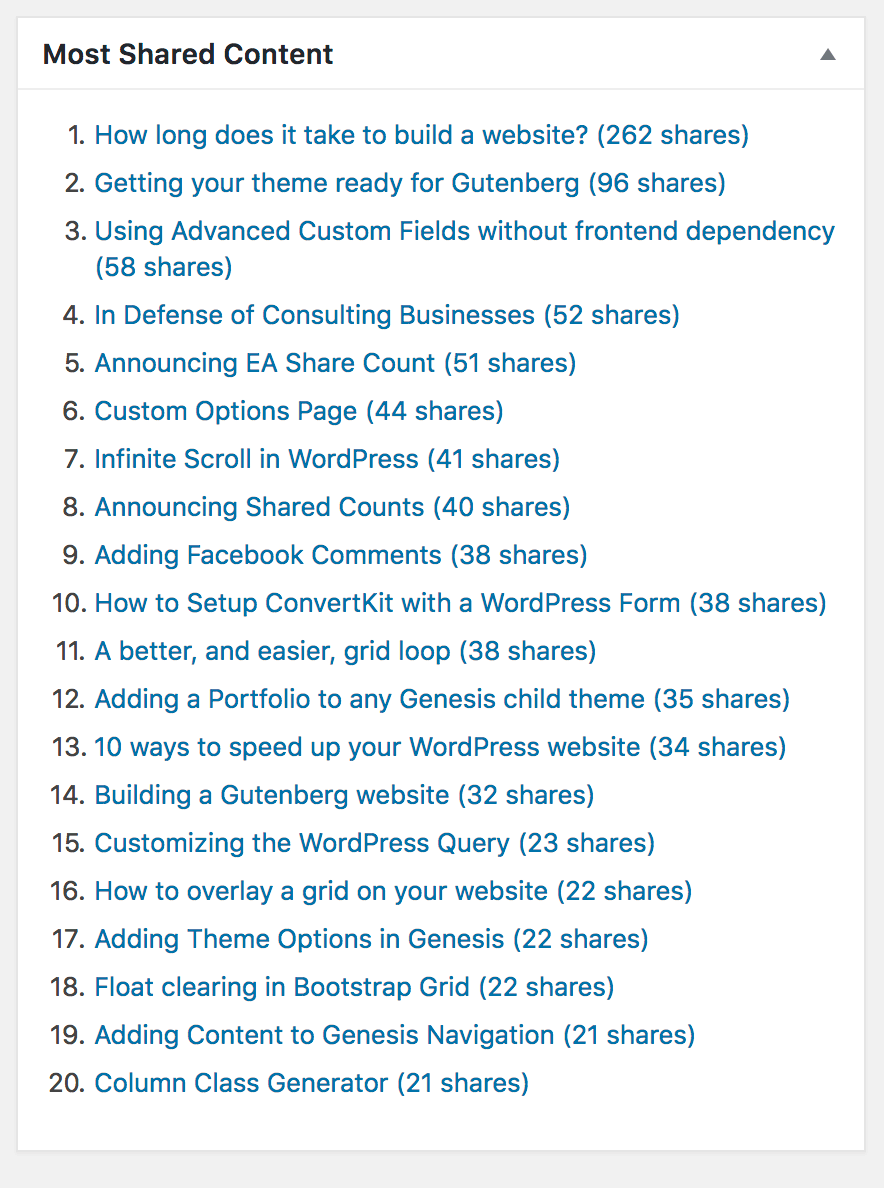
If you look in the plugin’s source code you’ll see it’s a simple WordPress query.
| <?php | |
| $loop = new WP_Query( array( | |
| 'posts_per_page' => 20, | |
| 'orderby' => 'meta_value_num', | |
| 'order' => 'DESC', | |
| 'meta_key' => 'shared_counts_total', | |
| ) ); | |
| if ( $loop->have_posts() ) { | |
| $posts .= '<ol>'; | |
| while ( $loop->have_posts() ) { | |
| $loop->the_post(); | |
| $shares = get_post_meta( get_the_ID(), 'shared_counts_total', true ); | |
| $posts .= sprintf( '<li><a href="%s">%s (%s %s)</a></li>', | |
| esc_url( get_permalink() ), | |
| get_the_title(), | |
| esc_html( $shares ), | |
| esc_html( _n( 'share', 'shares', $shares, 'shared-counts' ) ) | |
| ); | |
| } | |
| $posts .= '</ol>'; | |
| } | |
| wp_reset_postdata(); |
The Shared Counts plugin stores the post’s total share count as metadata using the shared_counts_total key. We are asking WordPress to sort the posts by this numerical meta key and give us the first 20 posts with the highest count.
Display Subpages
My BE Subpages Widget plugin allows you to dynamically list a section’s subpages. When on a page, it will find the section’s top level page and list its children. It will also mark the current page as “active” so you can style it appropriately.
| <?php | |
| $parents = array_reverse( get_ancestors( get_the_ID(), 'page' ) ); | |
| $parents[] = get_the_ID(); | |
| $loop = new WP_Query( array( | |
| 'post_type' => 'page', | |
| 'post_parent' => $parents[0], | |
| 'orderby' => 'menu_order', | |
| 'order' => 'ASC', | |
| ) ); | |
| if( $loop->have_posts() ): | |
| echo '<ul>'; | |
| while( $loop->have_posts() ): $loop->the_post(); | |
| $class = 'menu-item'; | |
| if( get_the_ID() == get_queried_object_id() ) | |
| $class .= 'current-menu-item'; | |
| echo '<li class="' . $class . '"><a href="' . get_permalink() . '">' . get_the_title() . '</a></li>'; | |
| endwhile; | |
| echo '</ul>'; | |
| endif; | |
| wp_reset_postdata(); |
I’ve simplified the code a bit (you can see the actual code here), but basically we’re using get_ancestors() to get the full page hierarchy of the current section, grabbing whatever page is at the top, then using a WP_Query to retrieve all of its children.
Inside the loop, I’m comparing get_the_ID(), the ID of the current post in the custom query, to get_queried_object_id(), the ID of the current post in the main query, to determine if we should mark this menu item as active.

Leaf says
Could this work with Sticky posts also?
Bill Erickson says
Yes, see the Codex for how to query Sticky posts: http://codex.wordpress.org/Function_Reference/query_posts#Sticky_Post_Parameters
Sam Hooker says
This worked great for a custom taxonomy I needed to pull onto a Featured Portfolio page. Thanks, Bill — hail to the king 🙂
Gianfranco says
There is a spelling mistake in the line “if( $tips->hvae_posts() ):”
“have”, instead of “hvae”!
Just in case some will copy/paste the code. 😉
Bill Erickson says
Thanks! I’ve updated it.
Kirsten says
The code above is also missing an ENDIF; statement.
Bill Erickson says
Good catch. I’ve updated the code, so once my cache refreshes the change will be visible. Thanks!
Jenny Beaumont says
Hya,
This is great, really helping me understand best practices for custom queries. Quick question and maybe kinda random: what the purpose of defining ‘posts_per_page’ => ‘-1’? I’ve tried to find answers on the forums, but can’t find an explanation. Why -1?
thanks!
Bill Erickson says
-1 simply means “return all posts”. It indicates no limit on the number of posts per page. You could set an arbitrarily high number, like 9999, but -1 will always return all, so that’s why it’s the best practice.
Nathan Schmidt says
Is there a way to query the posts, dynamically? for instance, in your arguments where you have:
‘tag’ => ‘thesis-tip’,
What if you don’t know what your ‘tag’/’term’/whatever is set to because the page is generated dynamically, for instance on a template page which could fall under any number of tags, categories or taxonomies?
This is where I am stuck: I want my query to pull posts related to the one currently shown by its taxonomy term, but I don’t know what the term is beforehand because the template my function is used for could be outputting any number of the custom post types in my theme that fall under several different taxonomy terms.
RMO says
You can easily do this, in the main query in your template, store the value or id of the category/tag in a variable, the just send the variable into the tag key in the array
Adrien Sanborn says
Just wanted to state that this article saved my life. I have a decent grasp of custom queries, but I was trying to figure out how to set up custom loops like this. The code worked perfectly.
Then, using this code, I found a way to run the loop multiple for each item in an array. Names of headers and classes and so on change dynamically based on array info.
The next step is to figure out how to read data from custom taxonomies. Thanks for this and all your tutorials, Bill!
Here is the code, for anyone who is curious. It contains a sample array, but I’ll soon replace it with a dynamic array based on the custom taxonomy meta. This code is in ‘home.php’: https://gist.github.com/billerickson/8114100
Carles says
I found something interesting.
In a single-cpt.php template, I was trying to show the links for the children posts of that cpt. Let’s say this is a ‘resort’ cpt wich is parent of ‘webcams’ and ‘hotels’ cpt’s, both set up as hierarchical.
So I defined some arguments in an array: post_type (array), posts_per_page (-1), post_status (publish) and ‘post_parent’ ($post). Nothing fancy at all.
I know that, for every parent post, there will be only one child post every time, so one resort will only have only one webcams child post and one hotels child post. In my mind, that gave me the option of doing a wp_query or not.
So, Option-1 would be $webcams-child = get_posts( $args) and then I can echo the permalink for $webcams-child[0]->ID, for example. No wp_query here.
Option-2 includes the usual custom loop through the possible results with wp_query, if and while, and then wp_reset_postdata.
Now, according to the Query Monitor plugin, the first option (no wp_query) adds 3 more queries to the database, while the second option adds 4 more queries. BUT, if you delete the posts_per_page argument from $args, the first option ADDS 1 more query (so now you have 4 queries on the database) and the second option adds 2 more queries (so 6 queries to the database). In all cases, the memory usage stays more or less the same, no increments here.
My poor logic guessing says that this is related to narrowing the scope of the arguments in the first place. But, curiously enough, deleting the post-status argument (which then, makes the system search in all published, draft, etc. elements) doesn’t add any query or memory usage at all. So I’m not sure. Of course, I did some experimentation and a badly optimized wp_query can easily become really expensive in terms of database queries, memory usage and response time, like multiplying them by a lot to obtain the same results.
What I would like to know is then: if you add some more arguments to the $args, those 3 or 4 database queries could become less in number, even just 1 query? I think this is really interesting because my case is very simple, but others may encounter big issues due to a bad optimisation of the $args in the first place.
Bill Erickson says
When you do a WP Query, you’re actually doing 4 queries: the actual query for the posts you want, a query to determine the total number of posts matching the query (for pagination), all the post meta for the returned posts, and all the taxonomy terms for the returned posts. You can disable the ones you don’t need like so: https://www.billerickson.net/code/improve-performance-of-wp_query/
You can also specify
'fields' => 'ids'to just receive a listing of the post IDs, not all the additional post information (title, content, excerpt…).Carles says
Thanks Bill, I didn’t know that. It may be extremely useful in some cases.
I’m not sure if this is clearly written in the Codex, I will check it out. I only have one pending doubt: if I delete the posts_per_page arg, it adds 2 more queries. Do you know what are they for?
Thanks very much. I often read a lot of resources to understand WP and Genesis development, but I find myself keep coming back here and getting truly useful information. Thanks again.
Bill Erickson says
I’m not sure why you’re seeing an additional query. If you don’t include posts_per_page it uses the default in Settings > Reading, so that shouldn’t affect your query count. You can use Debug Bar and Query Monitor to see all queries run for the current request, which can help you figure out what’s happening.